Does your Brita water dispenser taste stale or flow slower than usual? You likely need to learn how to change filter in Brita water dispenser units to restore fresh, clean water quality. Ignoring this maintenance step allows contaminants like chlorine and lead to bypass the filtration system entirely.
This guide walks you through identifying your filter type, priming it correctly, and resetting your indicator light. You will also discover common mistakes that cause leaks and how to extend the life of your unit with proper care.
Identify Your Specific Brita Filter Type
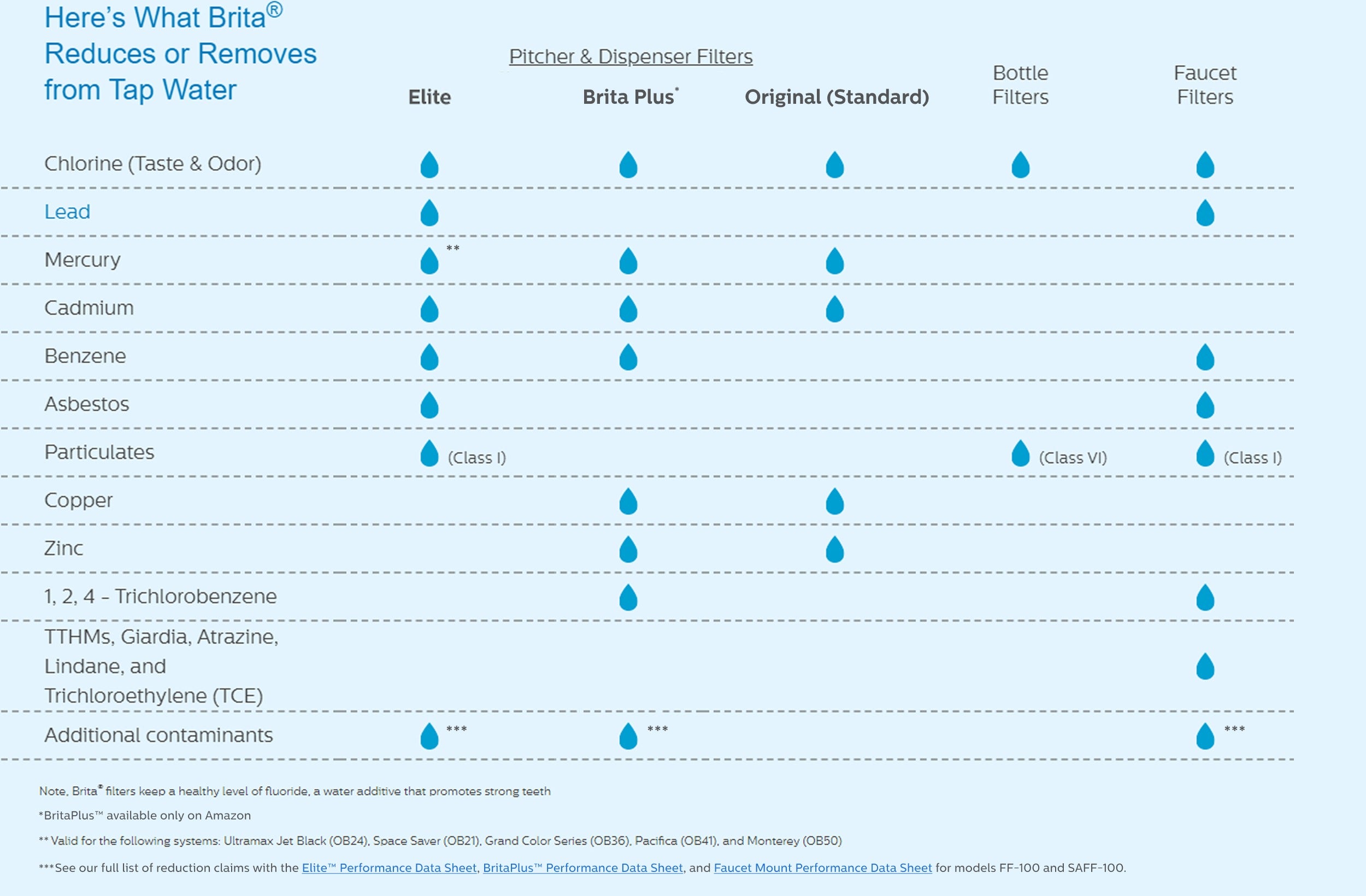
Choosing the wrong replacement part causes leaks and poor water quality. You must match the filter model to your specific dispenser design before purchasing or installing.
Standard vs Elite Filter Differences
The Brita Original (Standard) Filter (OB03) fits most pitchers and dispensers. It requires replacement every 2 months or 40 gallons and must be rinsed under cold water for 15 seconds before use. This model reduces chlorine, copper, cadmium, and mercury while keeping healthy minerals.
The Brita Elite (Long Last) Filter is designed for UltraMax and select dispensers. It lasts up to 6 months or 120 gallons and comes pre-rinsed from the factory. This advanced option removes lead and sediment more effectively than the standard version.
Pro Tip: Check your dispenser manual or the old filter number to confirm compatibility. Using a Standard filter in an Elite system reduces performance significantly.
Prepare the Dispenser and New Filter
Proper preparation prevents cloudy water and bacterial growth inside your reservoir. Cleanliness is key before you install any new components.
Clean the Dispenser First
- Remove the lid and pull out the old filter from the reservoir.
- Wash the reservoir and lid with mild dish soap and warm water.
- Rinse all parts thoroughly to ensure no soap residue remains.
- Dry components with a clean towel or let them air dry completely.
⚠️ Warning: Never place Brita parts in a dishwasher or use abrasive cleaners. These can scratch the plastic and cause chemicals to leach into your water.
Prime the New Filter Correctly
- For Original Filters: Hold the filter under cold tap water for 15 to 20 seconds.
- This step flushes out loose carbon dust that causes cloudy water.
- Do not use hot water as temperatures above 85°F damage the filter core.
- Elite filters skip this step since they arrive pre-rinsed and ready.
Remove the Old Filter Safely
Replacing the filter starts with safely removing the used unit without damaging the socket.
Step-by-Step Removal Process
- Empty any remaining water from the main reservoir completely.
- Lift off the lid to access the filter housing inside the unit.
- Grip the old filter cylinder firmly with your hand.
- Pull the filter straight up from the socket with moderate force.
🗑️ Dispose Responsibly: Do not throw used filters in regular trash. Brita partners with TerraCycle for recycling. Visit the official Brita recycling page to find drop-off locations or mail-in options.
Install the New Filter Properly

Correct installation ensures a tight seal that prevents unfiltered water from bypassing the media.
Align and Insert the Filter
- Locate the groove on the side of your new filter cartridge.
- Match this groove to the notch inside the reservoir filter compartment.
- Press the filter straight down until it clicks or feels fully seated.
✅ Check the Seal: If the filter wobbles or does not lock in, realign the groove and press again. A loose fit allows unfiltered water to mix with your clean water.
Reattach the Lid Securely
- Snap the lid back onto the dispenser ensuring it sits flat.
- Check for any gaps or misalignment around the filter area.
- On UltraMax models, ensure the bottom panel covering the filter is closed tightly.
Prime and Flush the System
This critical step clears air pockets and remaining carbon residue for clean-tasting water.
First-Time Use Protocol
- Fill the reservoir to the max line with cold tap water only.
- Allow the water to filter through completely into the lower basin.
- Discard the entire first batch of water to remove remaining fines.
* This water is safe for watering plants but not for drinking. - Refill the unit and your water is now ready for normal use.
🔁 Note: Some users notice a slight carbon taste in the first few uses of Standard filters. Discarding the first batch usually resolves this issue immediately.
Reset the Filter Indicator Light
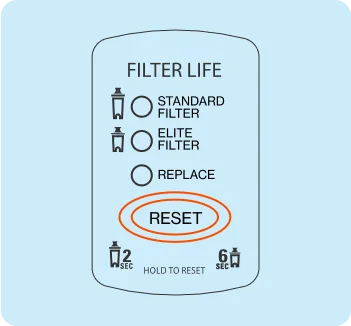
Keeping track of filter life ensures you replace it before contaminant reduction fades.
Reset Electronic Indicator
- Standard Filter: Press and hold the status button for 2 seconds.
- Elite Filter: Hold the button for 6 seconds to set the 6-month cycle.
- The light should flash or reset to green or blue depending on your model.
💡 Note: The sensor tracks usage when the lid is open for 15 seconds or more. Brief openings may not register a fill event.
Manual Tracking Options
No electronic indicator? Try these manual methods:
- Use the calendar sticker on the dispenser to mark install dates.
- Set a phone reminder for 60 days (Standard) or 180 days (Elite).
- Track gallons used: Standard equals 40 gallons and Elite equals 120 gallons.
Time-Saver: If you refill three times a week, a Standard filter lasts about 8 weeks. Adjust your schedule based on household size.
Troubleshoot Common Issues
Fix problems fast to keep your dispenser running smoothly and efficiently.
Water Filters Too Slowly
- ✅ Check: Is the filter seated correctly in the socket?
- ✅ Consider: High sediment in tap water can clog filters early.
- ✅ Fix: Replace the filter sooner or pre-filter hard water sources.
Strange Taste or Odor
- Carbon taste? The filter was not rinsed enough (Standard filters only).
- Stale taste? The filter has expired and needs immediate replacement.
- Plastic smell? Wash the dispenser with a vinegar solution then rinse well.
Leaking at Base
- 🔍 Cause: Filter not fully inserted or misaligned in the notch.
- 🔧 Fix: Remove and reinsert ensuring the groove locks into place.
- 🧽 Check for cracks in the reservoir or lid seals if leaking persists.
Maintain Your Dispenser for Longevity
Regular care keeps water safe and your unit functioning for years.
Cleaning Schedule
- Every filter change: Wash reservoir and lid with soapy water.
- Monthly: Deep clean with vinegar solution to remove mineral buildup.
- Never store water for more than 2 days without refrigeration.
Storage Tips
- Store in the refrigerator for cold, fresh-tasting water daily.
- Empty and dry the unit if you will not use it for several days.
- Keep out of direct sunlight to prevent algae growth inside.
Environmental and Cost-Saving Benefits
Switching to a Brita dispenser saves money and reduces plastic waste significantly.
Reduce Plastic Waste
- One filter replaces up to 300 plastic water bottles based on lifespan.
- Join the Brita recycling program to keep used filters out of landfills.
Save Money Over Time
| Filter Pack | Cost | Cost Per Month (2-Month Filter) |
|---|---|---|
| Single | $7.99 | $4.00 |
| 6-Pack | $29.99 | $1.00 |
💡 Buying in bulk cuts cost by 75% and ensures you never run out of clean water.
Final Tips for Best Results
- Always use cold tap water because hot water damages filters.
- Replace filters on schedule since contaminant reduction fades before flavor.
- Keep the lid closed when not filling to prevent dust entry.
- Consider more frequent changes in hard water areas to prevent buildup.
Frequently Asked Questions About Changing Brita Filters
How often should I change my Brita dispenser filter?
You should change Standard filters every 2 months or 40 gallons. Elite filters last longer and need replacement every 6 months or 120 gallons depending on usage.
Why does my filtered water taste like carbon?
This usually happens if you did not rinse a Standard filter for 15 seconds before installation. Discard the first full reservoir of water to fix this issue.
Can I use hot water in my Brita dispenser?
No, never use water hotter than 85°F. Hot water damages the filter media and reduces its ability to remove contaminants effectively.
How do I know if my filter is installed correctly?
The filter should sit flush with no wobble and often clicks into place. If water leaks around the base, remove and realign the groove with the notch.
Do I need to rinse Elite filters before using them?
No, Brita Elite filters come pre-rinsed from the factory. You can install them directly into the dispenser without rinsing.
Key Takeaways for Changing Your Brita Filter
Knowing how to change filter in Brita water dispenser units ensures your family drinks safe, great-tasting water every day. Remember to rinse Standard filters, align the groove properly, and reset your indicator light after installation.
Start by identifying your filter type and gathering your supplies today. Follow these steps to maintain your system and enjoy fresh water without the plastic waste.