You press the water button on your refrigerator but nothing happens. No drip, no flow, and no sound suggest your fridge water dispenser is locked rather than broken. Many modern units feature a child or control lock that stops spills and accidental changes instantly.
This guide explains exactly how to unlock fridge water dispenser systems for Samsung, LG, Whirlpool, and Frigidaire models. You will learn to spot lock indicators, perform the correct button sequence, and fix flow issues if water still will not come out.
Identify If Your Fridge Water Dispenser Is Locked
A locked dispenser often looks like a mechanical failure because the buttons do not respond to touch. You must look for specific visual cues on your control panel to confirm the status before attempting repairs.
Look for the Padlock Icon or Text Warning
The most common sign is a small padlock symbol (🔒) glowing on your display screen. Some Frigidaire models display the text “Control Locked” instead of a symbol. If you see either indicator, the system is intentionally disabled to prevent use.
Test Button Responsiveness
Try pressing the water or ice selection buttons firmly. A locked system will show no light changes and make no noise when you press these keys. This total lack of response confirms the lock feature is active and not a broken switch.
Unlock Samsung Refrigerator Water Dispenser
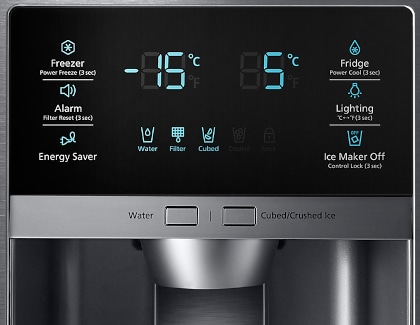
Samsung models often require a specific hold time and may involve a two-step process depending on your specific unit configuration. Following the exact sequence is critical to restoring water flow quickly.
Hold the Water Button for Three Seconds
Locate the button marked with a water droplet icon on your front panel. Press and hold this button continuously for exactly 3 seconds until you hear a single beep. The padlock icon will vanish, and the dispenser will immediately become functional again.
Use the Two-Step Panel Unlock Method
Some Samsung units require you to unlock the main control panel before accessing the dispenser settings.
1. Press and hold the “Door Alarm” button for 3 seconds to unlock the main panel.
2. Press and hold the “Water/Ice” button for another 3 seconds to disable the dispenser lock.
Skipping the first step will prevent the second step from working on these specific models.
Fix Frigidaire Dispenser Lock Issues

Frigidaire Gallery and standard models use a dedicated lock button that requires a slightly longer hold time to prevent accidental activation during cleaning.
Press and Hold the Lock Button
Find the button labeled “Lock” or the one showing a padlock icon on your touchscreen interface. Press and hold this key for 3 to 5 seconds until the “Control Locked” message disappears from the screen. The panel will return to normal operation immediately after the text vanishes.
Verify Full System Restoration
Test the water lever with the refrigerator door fully closed to ensure success. All functions including water, ice, and temperature settings should respond to your touch without delay.
Disable Child Lock on LG and Whirlpool Models

LG and Whirlpool refrigerators share a nearly identical universal method for managing the child lock feature across most French door and side-by-side models.
Activate the Child Lock Toggle
Locate the “Child Lock” button or the padlock icon on your control panel. Press and hold this button for 3 seconds until the lock symbol turns off or disappears from the display. You may not hear a beep, so rely on the visual change of the icon to confirm the unlock.
Confirm Water and Ice Functions
Attempt to dispense water or select an ice type to verify the system is ready. Both the water and ice dispensers will resume normal operation once the symbol is gone.
Troubleshoot No Water Flow After Unlocking
If the lock icon is gone but water still will not flow, the issue likely involves your filter, supply line, or trapped air rather than the lock itself.
Remove and Test the Water Filter
Take out the water filter completely and try to dispense water again. If water flows freely without the filter, your current filter is clogged and needs immediate replacement. Never run the system long-term without a filter as it can damage internal parts.
Check Water Supply Valve and Lines
Ensure the water supply valve behind the refrigerator is turned fully open to allow maximum pressure. Verify that the water line connection at the back of the unit is secure and not kinked. If you recently moved the fridge, check the door coupling to ensure the line reconnected properly.
Purge Air From the Water Line
Air pockets can block flow after installing a new filter or refrigerator.
1. Place a large container under the dispenser.
2. Hold the water lever down continuously for up to 5 minutes.
3. Dispense 2 to 3 gallons of water until the stream is steady and free of sputtering.
Avoid These Common Unlocking Mistakes
Users often miss simple details that prevent the unlock sequence from working correctly. Avoiding these errors will save you time and frustration.
Leaving the Refrigerator Door Open
Many models including Samsung and LG will not dispense water if the door is even slightly ajar. Always ensure the door is fully closed before testing the dispenser, as the system disables automatically when open.
Skipping the Filter Reset Step
Some units require a manual filter reset after replacement to restore full water pressure. If you installed a new filter but forgot to reset the indicator, the system may restrict flow. Consult your manual for the specific reset combination for your model.
Assuming Mechanical Failure Too Quickly
Most no-water issues are not broken parts but rather locked controls or air in the lines. Rule out the lock feature and filter issues before calling a technician, as these are the cause in most cases.
Know When to Call Professional Service
There are specific scenarios where DIY troubleshooting will not fix the problem and professional help is necessary.
No Water With Filter Removed
If you removed the filter and still get no water, the issue is likely a failed inlet valve or frozen line. These components require professional diagnosis and replacement to restore function safely.
Recurring Lock Activation
If your dispenser locks itself repeatedly without user input, the control board may be faulty. Consistent failure of standard unlock steps indicates an electronic issue needing service attention.
Frequently Asked Questions About Fridge Water Dispensers
How long do I hold the button to unlock the dispenser?
Most brands require holding the lock or water button for 3 seconds. Frigidaire models may need up to 5 seconds. Listen for a beep or watch for the lock icon to disappear as confirmation.
Why is my Samsung dispenser not working even when unlocked?
Samsung models often will not dispense if the refrigerator door is open. Ensure the door is completely closed and try the two-step unlock method using the Door Alarm button first.
Can a clogged filter stop water after unlocking?
Yes, a clogged filter can block flow even if the lock is off. Remove the filter to test flow, and replace it if water comes out without it.
What does the padlock icon mean on my fridge panel?
The padlock icon indicates the child or control lock is active. This feature disables the water and ice dispensers to prevent accidental use or spills.
How much water should I dispense to clear air lines?
You should dispense 2 to 3 gallons of water to fully purge air from the lines. This process can take up to 5 minutes of continuous dispensing.
Key Takeaways for Unlocking Your Fridge Water Dispenser

Restoring water flow usually requires only a simple button sequence rather than a costly repair call. By identifying the lock icon and holding the correct button for 3 to 5 seconds, you can resolve most dispenser issues instantly.
Remember to check your water filter and supply lines if the lock removal does not fix the flow problem. Keep this guide handy to quickly address any future lockouts and ensure your refrigerator stays fully functional.