If your Culligan water softener stops regenerating or displays error lights, you need to know how to reset Culligan water softener units quickly. Hard water issues can disrupt daily life in Howard-Suamico, so restoring your system is urgent.
This guide provides step-by-step instructions for resetting digital and mechanical Culligan models. You will learn troubleshooting tips, safety checks, and maintenance advice to ensure your soft water returns immediately.
Reset Basic Culligan Mechanical Models
Older Culligan units rely on mechanical timers rather than digital screens. These systems require manual intervention to force a regeneration cycle when they stall.
Manually Start the Regeneration Cycle
You can force these units to clean themselves by turning the internal timer mechanism. This process flushes minerals from the resin bed.
- Locate the regeneration knob on the front or side of the control head.
- Turn the knob clockwise slowly until you hear a distinct click.
- Wait 2 to 3 hours for the full cycle to finish without interruption.
- Test your water after 24 hours to confirm softness has returned.
Note: Do not use water during this cycle. Interrupting the flow can cause the unit to lock up again.
Bypass and Re-Engage the System Valve
A simple power cycle often resolves minor mechanical lockups in older units. This method resets the hydraulic pressure within the valve.
- Switch the bypass valve to the “bypass” position to stop water flow to the softener.
- Wait exactly 30 seconds to let pressure equalize.
- Return the valve to “service” mode to resume normal operation.
Pro Tip: Write down the current time before starting. This helps you track when the cycle should end.
Reset Digital Culligan HE and High Efficiency Models

Newer High Efficiency (HE) models use electronic control boards. These require specific button combinations to clear errors and restart the system.
Perform a Soft Reset on the Control Panel
A soft reset clears temporary glitches in the software without erasing your hardness settings. This is the first step for frozen screens.
- Press and hold the “Select” or “Menu” button for 5 to 10 seconds.
- Watch for the display to flash or return to the default home screen.
- Navigate to “Regenerate Now” using the arrow keys.
- Press “Select” to initiate the cleaning cycle.
Visual Cue: If the screen remains blank after this step, check your power source immediately.
Force Regeneration Through Digital Menus
Use this method if the unit is responsive but refuses to clean automatically. It ensures a complete flush of the resin tank.
- Use the up and down arrows to scroll to “Manual Regeneration.”
- Press “Select” to confirm your choice.
- Allow the system to run its 2-hour cycle undisturbed.
Warning: High water demand during this process can dilute the brine and ruin the regeneration.
Troubleshoot Common Reset Failures
Sometimes a standard reset fails because of physical obstructions or power issues. You must address these root causes to restore function.
Diagnose Power Supply Issues
A lack of power is the most common reason a digital unit will not reset. Your softener needs consistent electricity to operate the timer and valves.
- Ensure the power cord is plugged firmly into the wall outlet.
- Test the outlet with a lamp or phone charger to verify voltage.
- Check your circuit breaker panel for a tripped switch serving the laundry or utility area.
Fix: Plug the unit directly into a grounded outlet. Avoid using extension cords as they can cause voltage drops.
Resolve Brine Tank Problems
The brine tank creates the salt solution needed for cleaning. If this tank fails, the reset process cannot complete successfully.
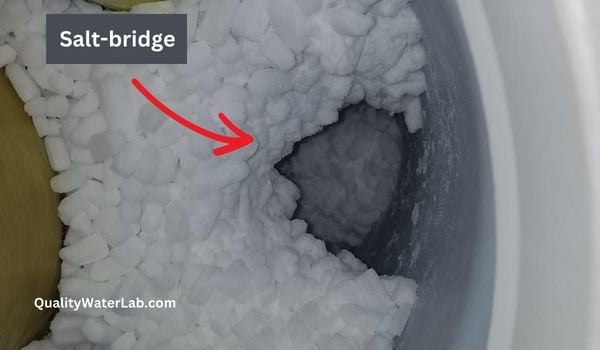
Break Up Salt Bridging
Salt bridging occurs when salt forms a hard crust above the water line. The system thinks it has salt but cannot draw any.
- Open the brine tank lid carefully.
- Use a broom handle to gently break the hardened salt layer.
- Remove excess water if the tank is overflowing.
- Refill with pellet or cube salt designed for softeners.
Address Low Salt Levels
Insufficient salt prevents the creation of brine. The system cannot regenerate without this crucial ingredient.
- Add 3 to 4 bags of water softener salt to the tank.
- Maintain the salt level so it is always at least half-full.
- Avoid using rock salt as it contains impurities that clog valves.
Pro Tip: Using Culligan-approved salt reduces sediment buildup and improves long-term efficiency.
Decode Error Lights and Messages

Digital panels use colored lights to communicate specific faults. Understanding these signals helps you apply the correct fix.
Interpret Flashing Red Lights
A flashing red light usually indicates a system fault or a missed regeneration cycle. It signals that the unit attempted to clean but failed.
- Press and hold “Select” for 10 seconds to clear the error code.
- Initiate a manual regeneration immediately.
- Inspect the drain line for kinks if the light returns.
Analyze Solid Yellow or Amber Indicators
This light typically serves as a maintenance reminder rather than a critical failure. It often means the salt level is low.
- Add salt to the brine tank immediately.
- Clean the brine tank if sludge is visible at the bottom.
- Reset the timer via the control panel to clear the alert.
Investigate Units With No Lights
If the display is completely dark, the unit has lost all power. This is different from a software glitch.
- Check the outlet power with another device.
- Reset the GFCI outlet if one is installed in the utility room.
- Contact support if the unit remains dead after checking power sources.
Expert Note: Persistent error lights after a reset may indicate a faulty transformer or solenoid valve requiring replacement.
Prevent Future Reset Needs

Regular maintenance minimizes the need for emergency resets. A well-cared-for system lasts longer and performs better.
Schedule Monthly Maintenance Checks
Consistent inspections catch small problems before they become major failures. This saves you time and money on repairs.
- Inspect salt levels every week to prevent bridging.
- Clean the brine tank thoroughly every six months.
- Check all valves and connections for small leaks.
Reboot After Power Outages
Storms and grid fluctuations can scramble your softener’s internal clock. You must reset the time to ensure proper scheduling.
- Reset the clock on digital models immediately after power returns.
- Force a regeneration to realign the cleaning schedule.
- Verify that the time and day settings match the current time.
Consequence: Incorrect time settings cause regeneration during peak usage hours, wasting water and salt.
When to Call a Culligan Technician
Some problems exceed the scope of a simple reset. Professional diagnosis is necessary for complex mechanical or electronic failures.
Identify Signs Requiring Professional Help
You should seek expert assistance if basic troubleshooting does not resolve the issue. Ignoring these signs can lead to permanent damage.
- The reset fails multiple times in a row.
- Water remains hard even after a successful regeneration cycle.
- Error codes persist on the display (e.g., E1, E3).
- You hear unusual noises like grinding or continuous running.
- There are visible leaks coming from the control valve.
Local Tip: Search for “Culligan dealer near Howard-Suamico, WI” to find authorized service providers familiar with local water conditions.
Benefits of Certified Service
Professional technicians offer advantages that DIY repairs cannot match. They ensure your system operates at peak efficiency.
- Warranty protection remains intact when certified pros perform repairs.
- Original parts guarantee compatibility and optimal performance.
- System tuning adjusts settings specifically for local water hardness levels.
Frequently Asked Questions About Resetting Culligan Water Softeners
How long does a Culligan water softener reset take?
A full regeneration cycle typically takes 2 to 3 hours to complete. However, you should wait 24 hours before testing water hardness to ensure the system has fully flushed and recharged.
Why is my Culligan softener not resetting?
Common reasons include power outages, salt bridging in the brine tank, or a clogged drain line. Check your power source and salt levels before attempting a reset again.
Can I reset my Culligan softener during a power outage?
No, the unit requires electricity to run the regeneration cycle. You must restore power and reset the clock before initiating a manual regeneration.
What does a flashing red light mean on my Culligan unit?
A flashing red light indicates a system fault or missed regeneration. Hold the “Select” button to clear the code and force a manual regeneration cycle.
How often should I regenerate my Culligan water softener?
Most systems regenerate automatically based on usage. However, if you notice hard water, you can force a manual regeneration once. Frequent manual resets indicate an underlying issue.
Is it safe to use water while the softener is resetting?
No, you should avoid using water during the regeneration cycle. Using water can interrupt the brine draw and result in hard water passing through to your taps.
Key Takeaways for Resetting Your Culligan Water Softener
Resetting your Culligan water softener is a straightforward task that resolves most common operational issues. By following the specific steps for your mechanical or digital model, you can restore soft water to your home in Howard-Suamico quickly. Regular maintenance and prompt attention to error lights prevent future disruptions.
If your system continues to struggle after a reset, do not hesitate to contact a certified technician. Professional service ensures your investment lasts for years while providing the high-quality water your family deserves.