Is your Morton water softener failing to deliver soft water despite a full salt tank? You might see error codes, hear strange clicking noises, or notice the display has gone completely blank. These issues often stem from salt bridging, power interruptions, or clogged internal valves that stop the regeneration cycle. Ignoring these signs leads to scale buildup in your pipes and reduced appliance lifespan.
This guide provides step-by-step Morton water softener troubleshooting to help you diagnose and fix common failures quickly. You will learn how to clear error codes E1 through E4, break stubborn salt bridges, and perform the essential MC-30 cleaning cycle. Follow these actionable steps to restore soft water flow and protect your home plumbing system.
Diagnose No Soft Water Production
When your water feels hard, the system is likely failing to regenerate due to supply issues or blockages. Start by checking the most accessible components before moving to complex mechanical parts.
Refill Empty Salt Tanks Immediately
An empty storage tank prevents brine creation, leaving resin beads saturated with hardness minerals. Without brine, the softener cannot recharge.
- Check the salt level visually through the tank opening.
- Refill immediately with Morton Clean and Protect or Pure and Natural pellets.
- Manually press “Recharge Now” on the control panel to start a cycle.
Pro Tip: Never let your salt level drop below Level 2. Maintain levels between 3 and 4 for optimal performance.
Break Salt Bridges to Restore Flow
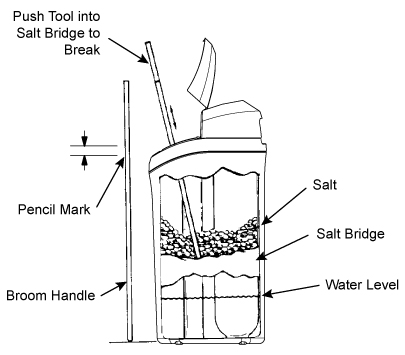
A salt bridge is a hard crust forming across the tank that traps salt above the water line. The tank looks full, but no brine is produced because the salt cannot dissolve.
- Inspect the tank to see if the salt level has stopped dropping.
- Use a broom handle or plastic tool to gently break the crust.
- Avoid metal objects that could crack the tank interior.
- Ensure water contacts the salt directly after breaking the bridge.
Verify Bypass Valve Position
A bypass valve pulled to the “out” position sends hard water directly to your taps, bypassing the softener entirely. This is frequently mistaken for a system failure.
- Locate the bypass valve stem on the plumbing connection.
- Ensure the stem is pushed firmly IN to the service position.
- Listen for a click to confirm it is locked in place.
Resolve Blank Display and Power Loss
A dark screen indicates a total loss of power, preventing any operation or regeneration cycles. You must restore electricity before addressing water quality issues.
Check Power Connections and Outlets
Start with the simplest solutions before assuming component failure. A loose cord or tripped breaker is often the culprit.
- Confirm the transformer is plugged securely into a working wall outlet.
- Check that the power cord connects firmly to the control valve.
- Test the outlet with a lamp or phone charger to verify power.
Reset Circuit Breakers and Fuses
If the outlet has no power, check your home’s electrical panel. Basements and utility rooms often share circuits with high-draw appliances.
- Locate the circuit breaker labeled for laundry or utility.
- Reset any tripped breakers by flipping them off and on.
- Replace blown fuses if your home uses a fuse box system.
Replace Defective Transformers or Boards
If the outlet works but the display remains dark, the transformer or internal control board may be dead. These components regulate voltage for the digital interface.
- Replace the transformer if the outlet tests positive but the unit is dead.
- Contact Morton Support at 1-888-649-2837 for electronic board replacement.
- Reset the clock and press “Recharge Now” once power is restored.
Fix Intermittent Hard Water Issues
Fluctuating water quality often results from timing conflicts, hidden leaks, or changes in your source water hardness.
Correct Time Settings and Schedules
An incorrect internal clock causes regeneration to occur during peak usage hours. This sends hard water to your fixtures when you need soft water most.
- Set the accurate time and day on the control panel.
- Schedule regeneration for 2:00 AM when household water use is minimal.
- Avoid using water while the display shows “Recharge.”
Detect Hidden Leaks and Usage Spikes
Small leaks in toilets or faucets can waste hundreds of gallons daily, exhausting the resin bed prematurely. This forces the system into frequent regeneration cycles.
- Turn off all water fixtures in the house.
- Watch your water meter; if it moves, you have a leak.
- Use dye tablets in toilet tanks to identify silent leaks.
Adjust for Increased Water Hardness
Your local water source hardness may have changed due to seasonal shifts or municipal adjustments. The current settings might be insufficient for the new load.
- Test incoming water hardness with a test strip or drop kit.
- Compare results to the programmed hardness setting on your unit.
- Update the control panel settings to match current water conditions.
Clear Motor Jams and Stop Noises
Clicking sounds or stalled motors indicate mechanical resistance preventing the valve from turning. Immediate action prevents permanent motor burnout.
Replace Stalled Motors and Seals
A clicking noise means the motor engages but cannot overcome resistance. This usually points to a jammed inner valve or a failing motor unit.
- Replace the motor if it fails to turn after multiple attempts.
- Install a new rotor and seal assembly if the valve is jammed.
- Lubricate O-rings with silicone grease during reassembly to reduce friction.
Silence Water Hammer Noises
Loud banging noises after cycles indicate hydraulic shock caused by rapid valve closure. This can damage plumbing joints over time.
- Install a water hammer arrestor near the softener inlet.
- Check inlet pressure; install a regulator if it exceeds 80 psi.
- Flush all faucets for one minute to remove trapped air pockets.
Eliminate Excess Water in Brine Tank
Too much water in the brine tank signals a failure in the brine draw cycle. This prevents salt from dissolving properly and stops regeneration.
Clean Clogged Nozzle and Venturi
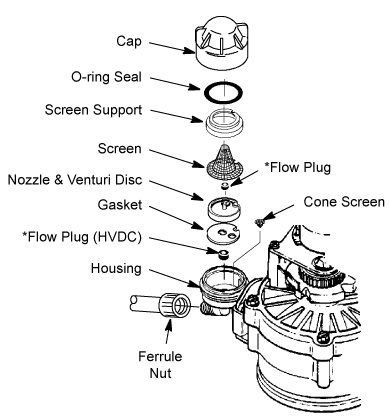
The nozzle and venturi create the suction needed to pull brine. Scale or debris buildup blocks this flow, leaving water standing in the tank.
- Shut off water and power to the softener.
- Remove the brine valve assembly carefully.
- Soak the nozzle and venturi in vinegar to dissolve scale.
- Use a small brush to clear debris before reassembling.
Inspect Brine Valve Float Mechanism
A stuck float fails to shut off water intake, causing the tank to overflow. The float must move freely to regulate levels correctly.
- Manually move the float up and down to check for sticking.
- Clean any debris restricting float movement.
- Replace the float mechanism if it remains sluggish or stuck.
Decode and Clear Error Codes E1–E4
Error codes E1 through E4 indicate specific electrical or mechanical faults within the control system. Do not ignore these warnings.
Identify Wiring and Switch Failures
These codes often mean the system cannot detect the valve position. This results from loose wiring harnesses or failed position switches.
- Power off the unit before inspecting internal wiring.
- Check the harness connecting the motor to the control board.
- Replace frayed wires or loose connectors immediately.
Clear Jammed Valves Triggering Errors
A physically stuck valve triggers high-torque errors, stopping the motor to prevent damage. The system halts until the obstruction is removed.
- Replace the rotor seal to free the stuck valve mechanism.
- Power cycle the unit by unplugging it for 30 seconds.
- Monitor the display to ensure the error code does not return.
Note: Error codes only clear automatically after the physical fault is repaired. Rebooting without fixing the issue will not work.
Perform Essential MC-30 Cleaning Cycle
Regular maintenance prevents sludge buildup and keeps your system running efficiently. You should clean your Morton softener every three months.
Prepare System for Cleaning
Ensure your salt level is adequate before starting. The cleaning agent requires specific conditions to work effectively.
- Verify salt is above Level 3 in the brine tank.
- Use only Morton MC-30-specific cleaning agent.
- Do not use household cleaners or vinegar for this cycle.
Execute Cleaning and Flush Steps
Follow the precise steps to ensure the cleaner removes scale and bacteria without damaging components.
- Pour the entire bottle of cleaner directly into the brine tank.
- Press and hold the “Clean” button until the motor starts.
- Wait up to two hours for the cycle to complete fully.
- Run cold water taps for 15–20 minutes to flush the system.
Test Resin Bed and Control Valve Function
If problems persist after cleaning and repairs, the resin bed or control valve may be compromised. Advanced diagnostics are required here.
Conduct Inlet vs. Outlet Hardness Test
Compare water hardness before and after the softener to determine resin health. This test confirms if the resin is exhausted.
- Test unsoftened water from an outdoor spigot or bypass tap.
- Test softened water from a kitchen faucet.
- If both show high hardness, the resin bed likely needs replacement.
Inspect Control Valve for Cycling Issues
A faulty control valve may run but fail to direct water correctly during regeneration phases. Listen closely during the cycle.
- Listen for silence when draining should occur.
- Check for gurgling sounds indicating air in the lines.
- Verify programming matches your household size and usage.
Frequently Asked Questions About Morton Water Softener Troubleshooting
Why is my Morton water softener not dropping salt levels?
This usually indicates a salt bridge or a bypassed system. Break any hard crusts in the tank and ensure the bypass valve is pushed in. If the salt still does not drop, the nozzle and venturi may be clogged.
How do I reset error codes E1, E2, E3, or E4?
You cannot simply reset these codes; you must fix the underlying issue first. Replace the faulty wiring, switch, motor, or rotor seal. Once repaired, power cycle the unit to clear the code.
How often should I clean my Morton water softener?
Clean your system every three months using the Morton MC-30 cleaning agent. This prevents sludge buildup, kills bacteria, and maintains warranty compliance.
What causes a blank display on my Morton softener?
A blank display means no power. Check that the transformer is plugged in, the circuit breaker is not tripped, and the outlet is working. If power is present, the control board may need replacement.
Can I use regular salt in my Morton water softener?
You should use high-quality pellet salt like Morton Clean and Protect. Avoid rock salt or blocks unless specified, as they create more residue and can clog the system.
Key Takeaways for Morton Water Softener Troubleshooting
Successful Morton water softener troubleshooting starts with checking simple issues like salt bridges, bypass valve positions, and power connections. Most hard water problems resolve by refilling salt, breaking crusts, or resetting the power supply. Regular maintenance, including the quarterly MC-30 cleaning cycle, prevents complex mechanical failures.
Address error codes immediately by replacing faulty motors, seals, or wiring harnesses. If you have followed these steps and still experience issues, contact Morton Support at 1-888-649-2837 for professional assistance. Keeping your system maintained ensures years of reliable soft water for your home.