If your Morton water softener stops producing soft water or displays error codes, you likely face salt bridges, clogged nozzles, or power failures. These common issues disrupt performance but often require only basic tools to resolve.
This guide helps you diagnose root causes and apply correct fixes without calling a technician. You will learn symptom-based troubleshooting, internal cleaning steps, and essential maintenance tips based on official protocols.
Diagnose Why Your Morton Softener Stops Making Soft Water
Specific symptoms point directly to the underlying issue when your unit underperforms. Start here to narrow down the problem before diving into complex repairs.
Check These Six Causes for Hard Water Output
If your water feels hard, investigate these six failure points in the exact order listed below.
- Salt Level Depleted
Empty salt tanks are the most common cause. Refill with Morton Clean and Protect or Pure and Natural pellets. Press “Recharge Now” immediately after refilling. - Nozzle and Venturi Clogged
Debris blocks flow and prevents regeneration. Disassemble the assembly, clean thoroughly, and check the venturi orifice. Replace cracked parts. - Inner Valve Leaking
Failed seals disrupt pressure inside the valve. Replace the rotor and seal assembly together to ensure a tight fit. - Drain Hose Blocked
Kinks or clogs stop wastewater from exiting. Inspect the full hose length and straighten any sharp bends. - Brine Valve Float Stuck
A dirty float stops brine intake. Clean the mechanism or replace the float if it does not move freely. - Tank-to-Valve Leak
Leaks at the junction compromise sealing. Replace the O-rings to reseal the connection effectively.
Pro Tip: Run a manual “Recharge Now” cycle after fixing any issue to reset the system and confirm soft water returns.
Restore Power When Display Is Blank
A dead display with no soft water indicates total power loss. Diagnose electrical issues in this specific order.
Test Outlet and Transformer Functionality
First, verify the outlet has power by plugging in a lamp or phone charger. Check the circuit breaker if the outlet is dead.
If the outlet works but the softener does not, the transformer or power cord may be faulty. Replace the entire unit if you find damage.
Check Bypass Valve Position
Ensure the bypass stem is pushed in for service mode. If pulled out, hard water flows around the unit entirely.
Reset After Power Restore
Once power returns, reset the clock immediately. Press “Recharge Now” to restart the cycle and begin softening water again.
If the display stays blank, the electronic control board may be dead. Contact customer service at 1-888-649-2837 for support.
Break Salt Bridges When Level Stays Static
If salt is not being used, brine is not forming. A salt bridge is often the culprit.
Detect and Remove Salt Bridges Safely
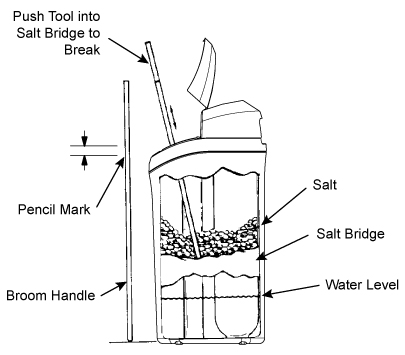
A salt bridge is a hard crust over a hollow cavity. It looks full but prevents salt from dissolving into the water.
How to detect it:
* Push a broom handle straight down into the salt mass.
* Feel for a hard layer below loose salt.
Removal steps:
1. Use a blunt tool like a wooden rod or plastic pipe.
2. Push down in multiple spots to crack the crust gently.
3. Break it into small pieces so water can dissolve the salt.
⚠️ Never use sharp objects. They can puncture the brine tank liner and require full replacement.
Confirm Bypass Valve Is In Service
If the bypass lever is engaged, the system is not softening water. Pull the stem out to engage bypass and push it in to return to service.
Verify Hardness Setting Accuracy
If the hardness setting is too low, the system regenerates less often than needed. Test your incoming water hardness and adjust the setting accordingly.
Resolve Intermittent Hard Water Problems
Water that fluctuates between soft and hard points to timing or usage errors. These issues are often easy to correct.
Correct Time Settings on Display
An incorrect clock causes regeneration at the wrong time. Check the display and adjust to the correct time of day.
Regeneration should occur during low-use hours like 2:00 AM. Avoid scheduling it during morning showers.
Avoid Water Use During Regeneration
Using water while the softener regenerates pulls hard water into pipes. Wait until the cycle finishes, which usually takes 1–2 hours.
Most units regenerate at night. Avoid laundry, showers, or dishwashing during this specific window.
Test Source Water Quality Spikes
Sudden spikes in hardness or iron can overwhelm the system capacity. Test unsoftened water regularly for changes.
- If hardness exceeds 25 gpg, reprogram the softener.
- For high iron, use Morton Clean and Protect Plus Rust Defense salt.
Fix Hidden Leaks in Plumbing
Even small leaks waste hundreds of gallons and exhaust softener capacity fast. Check toilet flappers and faucet washers.
Fix all leaks immediately to prevent premature exhaustion of the resin bed.
Fix Motor Stalls and Clicking Noises
A clicking sound or stalled motor means the valve cannot rotate. Mechanical resistance is usually the cause.
Replace Motor or Clear Valve Jam
Clicking often means the motor tries to turn but fails. Two primary causes exist for this issue.
- Motor failure – Replace the motor unit entirely.
- Valve jam – Caused by debris or scale. Replace the rotor and seal assembly to clear the blockage.
Note: High torque from a jam can burn out the motor. Replace both if the motor has been clicking for days.
Clear Error Codes E1, E2, E3, and E4
These codes mean the control board detects a mismatch between expected and actual valve position.
Replace Wiring Harness or Position Switch
Common causes include damaged wiring or loose connections. Inspect the harness for frays or loose plugs.
Fix:
1. Replace the harness if damaged visibly.
2. Replace the position switch if connections look intact but the code persists.
Free a Jammed Valve Mechanism
If the valve is stuck, it will not rotate to the correct position. Replace the rotor seal to eliminate binding.
Replace the Motor Unit
If the motor will not turn, the valve will not move. Replace it if other components check out fine.
Error Code Tip: Codes return if the root cause is not fixed. Do not clear the code until the repair is complete.
Clean the Nozzle and Venturi Assembly
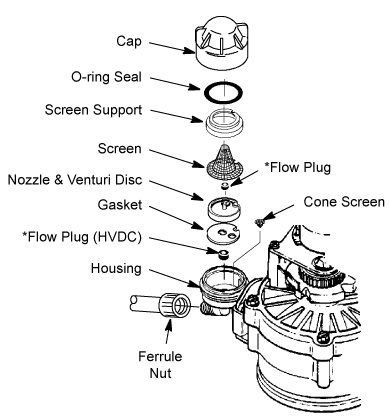
A clogged nozzle or venturi stops brine draw. This leads directly to hard water output.
Disassemble and Inspect Components
- Shut off water and power to the unit.
- Remove the nozzle and venturi housing carefully.
- Check for cracks, sediment buildup, or obstructed venturi orifices.
Clean and Reassemble Securely
- Flush all parts with water thoroughly.
- Use a toothbrush for stubborn debris removal.
- Ensure the tiny venturi hole is fully clear before reinstalling.
Pro Tip: Use only high-quality salt to reduce sediment buildup and extend nozzle life significantly.
Deep Clean MSD45E Models Specifically
The Morton MSD45E benefits from periodic internal cleaning. This maintains flow and pressure effectively.
Open the Unit Safely
- Disconnect power from the outlet.
- Press the side tab and unscrew the cover completely.
- Set aside the retention ring, blue insert, screen, and rubber seal.
Align Components Correctly
All parts have notches that must align perfectly. The rubber seal must be installed right-side up.
If installed upside down, it blocks the inlet. Align all notches before reassembly to ensure proper flow.
Lubricate Seals for Longevity
Apply a small amount of food-grade oil or petroleum jelly to O-rings. This prevents leaks and makes reassembly easier.
Flush the System Manually
Clear trapped debris by cycling through regeneration modes manually. This restores pressure and flow.
Backwash Flush Steps
- Push bypass lever once to enter Fill Mode.
- Push again to enter Brine Mode.
- Push third time to enter Backwash Mode.
Watch the drain hose closely during this process. Water starts clear, turns brown as sediment flushes, then returns to clear.
If pressure remains low, check the inlet hose for kinks or screen blockages.
Descale Internal Parts with Vinegar
Mineral buildup reduces efficiency over time. Use vinegar to dissolve scale effectively.
Vinegar Flush Procedure
- Turn off power to the unit.
- Connect a submersible pump to the inlet port.
- Place pump in a bucket of white vinegar.
- Run vinegar through the system for 30–60 minutes.
- Flush with clean water afterward to remove residue.
Bonus: Clean the internal screen during this process for best results.
After flushing, restore power and test water pressure and softness levels.
Replace Key Components When Needed

Some issues require part replacement. Use this guide to identify what to swap for your specific problem.
| Component | When to Replace | Fixes |
|---|---|---|
| Transformer | No power, blank display | Restore electricity |
| Control Board | Unresponsive, no display | Restore system logic |
| Nozzle & Venturi | No brine draw, clogged | Restore suction |
| Rotor & Seal | Leaks, motor stall, errors | Fix internal binding |
| O-rings | Leak at tank-valve junction | Stop external leaks |
| Brine Float | Salt level static | Restore brine intake |
| Wiring Harness | Error codes E1–E4 | Fix signal transmission |
| Position Switch | Valve position not detected | Restore cycle accuracy |
| Motor | Clicking, no rotation | Restore movement |
| Resin Bed | Persistent hard water | Last-resort replacement |
Note: Resin replacement is rare. Try chemical cleaning or multiple regenerations first.
Use the Right Salt and Lubricants
Prevent future issues with proper consumables. The right materials extend unit life significantly.
Best Salt Types
Use only these recommended products:
* Morton Clean and Protect™
* Clean and Protect Plus Rust Defense™
* Pure and Natural™ pellets
Avoid rock salt. It leaves sludge and increases bridging risk significantly.
Lubricate for Longevity
Apply food-grade oil or petroleum jelly to O-rings and rubber seals. This prevents drying, cracking, and leaks.
Validate Repair Success Thoroughly
After any fix, confirm it worked before considering the job done.
Test Water Hardness Levels
Use a test kit to check output water. It should read 0 gpg or as programmed.
Fluctuating results? Check for leaks or timer errors again.
Monitor Salt Usage Rates
Salt level should drop every 1–2 weeks depending on usage. No drop means brine draw issues persist.
Check Drain Discharge Quality
During backwash, expect initial cloudiness. Persistent cloudiness means resin may be breaking down.
Final Thoughts on Morton Water Softener Repair
Successful Morton water softener repair relies on accurate diagnosis and proper maintenance habits. Always check salt levels, clear salt bridges safely, and ensure power supply before replacing major parts. Regular cleaning of the nozzle, venturi, and internal screens prevents most common failures.
Keep your system running smoothly by checking salt weekly and testing water hardness quarterly. For complex issues or warranty claims, call Morton Customer Service at 1-888-649-2837 (Mon–Fri, 8 AM–5 PM CST). With this guide, you can handle most repairs confidently and save money on service calls.
Frequently Asked Questions About Morton Water Softener Repair
How do I reset my Morton water softener after a power outage?
Reset the clock to the correct time immediately. Press the “Recharge Now” button to initiate an immediate regeneration cycle and restore soft water production.
Why is my salt level not going down in the brine tank?
A salt bridge is likely preventing salt from dissolving. Use a blunt tool to gently break the hard crust inside the tank so water can reach the salt.
What do error codes E1, E2, E3, and E4 mean?
These codes indicate a mismatch between the expected and actual valve position. Check the wiring harness, position switch, or motor for mechanical binding or electrical faults.
How often should I clean the nozzle and venturi?
Clean the nozzle and venturi assembly every six months. Regular cleaning prevents clogs that stop brine draw and cause hard water issues.
Can I use vinegar to clean my Morton water softener?
Yes, white vinegar effectively dissolves mineral scale. Run a vinegar solution through the system using a submersible pump, then flush with clean water.
Why does my water softener make a clicking noise?
Clicking usually means the motor is trying to turn but cannot due to a jam or failure. Replace the motor or the rotor and seal assembly to fix the binding.