Hard water leaves crusty scale on fixtures, makes soap struggle to lather, and shortens the life of your appliances. Learning how to use Morton water softener systems correctly solves these issues by removing calcium and magnesium through ion exchange.
This guide walks you through testing water hardness, programming your specific model, and maintaining salt levels for peak performance. You will discover how to avoid common pitfalls like salt bridging while ensuring your unit regenerates efficiently.
Test Your Water Hardness Before Installation
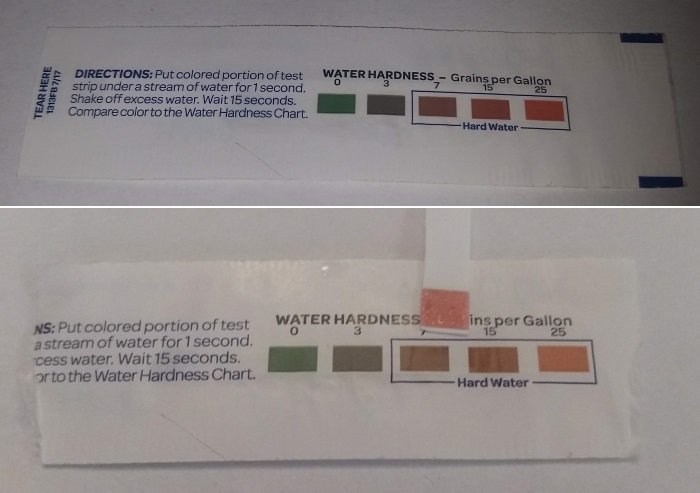
Accurate programming starts with knowing your exact water hardness level in grains per gallon. Morton provides free test strips to help you measure mineral content before you touch the control panel.
How to Get Accurate Hardness Readings
Dip a test strip into a sample of tap water and wait for the color change. Match the strip to the provided chart to find your grains per gallon (GPG) or parts per million (PPM) value. Record this number carefully because you will need it to program the unit.
Why Hardness Settings Matter
Your softener uses this data to calculate when to regenerate the resin beads that trap hardness minerals. Setting the value too low allows hard water to pass through, while setting it too high wastes salt and water.
Pro Tip: Retest your water every six to twelve months, especially if you notice scale returning or soap failing to lather properly.
Identify Your Specific Morton Model
Morton produces various systems with unique controls, so identifying your unit is essential for proper operation. Common series include the System Saver, Standard Grain models, and Wi-Fi enabled units.
Locate Your Model Number
Check the label on the control head or the side of the brine tank to find your specific model code. Popular options include:
* System Saver Series: MSD20F, MSD27B, MSD30D, MSD34C
* Standard Grain Models: M20, M27, M30, M34, M45
* Specialty Systems: MCWF, MHY, M45C Wi-Fi
Download the correct owner’s manual from the Morton website using this number or call 1-888-649-2837 for assistance.
Match Steps to Your Control Type
Not all models operate the same way since some use digital screens while others rely on dials. The M20 uses a simple dial interface, whereas the M45C allows app-based control. Always follow the model-specific instructions for regeneration and reset procedures.
Install in a Safe and Accessible Location
Proper placement ensures your Morton water softener functions reliably without risk of freezing or mechanical stress. The unit must sit near the main water line entry point to treat all water entering your home.
Choose a Level and Temperature-Controlled Spot
Place the system on a flat floor to prevent internal misalignment and ensure proper valve operation. The location must stay above freezing temperatures, so avoid unheated garages or outdoor sheds in cold climates.
Ensure Adequate Clearance for Maintenance
Leave enough space around the unit for ventilation during backwash cycles and easy access for servicing. You should have room to reach the brine tank lid and inspect plumbing connections without obstruction.
Warning: Installing your unit in an area prone to freezing can crack tanks and valves, leading to costly water damage.
Connect Plumbing with Bypass Valves
Correct plumbing installation prevents leaks and allows you to bypass the system during maintenance. You will need an adjustable wrench, Teflon tape, and the included bypass valve assembly.
Shut Off Water and Relieve Pressure
Turn off the main water supply completely before starting any work. Open the lowest faucet in your house to release residual pressure and prevent water bursts when cutting pipes.
Install the Bypass Valve Assembly
Attach the bypass valve to the inlet and outlet pipes using Teflon tape on all threaded joints for a watertight seal. Connect the softener inlet to the house supply and the outlet to the home plumbing, tightening gently to avoid cracking plastic fittings.
Check for Leaks After Restoring Flow
Slowly turn the main water back on and inspect every joint for drips or moisture. Tighten connections slightly if needed and dry all fittings so new leaks become visible immediately.
Start the Initial Regeneration Cycle
Running an initial regeneration flushes out shipping preservatives and activates the resin bed for softening. This step is critical before you begin using the water for bathing or laundry.
Fill the Brine Tank with Salt and Water
Pour four to six inches of water into the brine tank before adding salt. Fill the tank halfway with high-quality pellet or crystal salt, ensuring you do not overfill it.
Trigger Manual Regeneration Mode
Consult your manual to start a manual regeneration cycle, which typically takes 60 to 90 minutes. Press and hold the “Regenerate” button or follow the dial instructions to begin the backwash, brine draw, and rinse stages.
During this cycle, you will have temporary hard water, so avoid using water for cleaning or bathing until it completes.
Program Water Hardness Settings Accurately
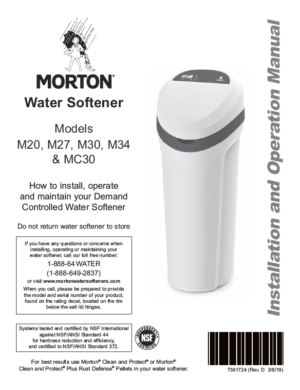
Entering your test results into the control head is the most important step in learning how to use Morton water softener systems effectively. This setting dictates your regeneration schedule.
Input Data on Digital Models
For models like the M30 or M45C, press the “Menu” or “Setup” button and select “Water Hardness.” Use the arrow keys to input your GPG value and save the setting before exiting.
Adjust Dial Settings on Basic Models
If you have an M20 or similar dial model, rotate the dial to the “Setting” or “Hardness” section. Align the pointer with your test result number on the scale and wait for the system to register the change.
Best Practice: If your water contains iron, set the hardness 5 to 7 GPG above your actual reading because iron consumes resin capacity.
Monitor Salt Levels Monthly
Regular salt checks prevent hard water breakthrough and ensure consistent softening performance. You should inspect your brine tank every four to six weeks.
Check and Refill Salt as Needed
Remove the brine tank lid and verify that salt fills at least half the tank. Never let the level drop below one-third full, or the system cannot create enough brine for regeneration.
Use the Correct Salt Type
Use evaporated salt pellets recommended by Morton to minimize sediment buildup. Avoid rock salt because it leaves more mush that can clog the tank and damage the system.
Never mix different salt types in the same tank, as this increases the risk of bridging and operational issues.
Prevent Salt Bridging and Mushing
Salt bridging occurs when a hard crust forms above the water line, blocking brine creation and stopping regeneration. Recognizing the signs early saves you from hard water problems.
Identify Signs of Salt Bridging
Look for a visible water level with no drop in salt volume over time. You may also see error codes or a “Check Salt” light that stays on despite adding more salt.
Break Up Crusts Gently
Turn off the power and use a broom handle to gently break any hard crusts inside the tank. Stir the salt and water together carefully before restarting the system to restore proper function.
Prevention Tip: Use high-purity salt pellets and check your tank monthly to prevent crust formation.
Utilize Wi-Fi Features on M45C Models
Owners of the M45C Wi-Fi model can enhance their experience by connecting to the Morton Water App. This feature allows remote monitoring and control from your smartphone.
Link Your System to the App
Download the app on iOS or Android and create an account to begin setup. Follow the pairing instructions and scan the QR code on your unit to establish a connection.
Manage Settings Remotely
Once connected, you can view salt levels, trigger regeneration cycles, and receive low-salt alerts from anywhere. This connectivity helps you avoid surprise hard water incidents when you are away from home.
Maintain System Longevity with Cleaning
Annual cleaning of the brine tank removes sediment and salt residue that accumulate over time. This simple maintenance task prevents mushing and extends the life of your unit.
Clean the Brine Tank Annually
Set the bypass valve to bypass mode and unplug the unit before draining the tank. Wipe the interior with a damp cloth, refill with fresh water and salt, and reset the system to service mode.
Ensure Proper Backwash Function
Verify that the drain line is secure and elevated to prevent siphoning during automatic backwash cycles. Ensure no kinks exist in the hose and that the floor drain is within 30 inches of the unit.
Troubleshoot Common Operational Issues
Even well-maintained systems can encounter issues, but most problems have simple solutions. Understanding these fixes helps you resolve them quickly without professional help.
Address Lack of Soft Water
If water remains hard after regeneration, check for salt bridges or low salt levels first. Verify your hardness setting and manually regenerate the unit again to see if performance improves.
Fix Leaks at Base or Fittings
Tighten any loose connections carefully without over-tightening plastic parts. Inspect O-rings for wear and ensure the bypass valve is fully open to stop water flow issues.
Resolve Control Panel Error Codes
Refer to your manual’s error code chart for specific meanings like power failures or flow errors. Reset the power by unplugging the unit for 30 seconds, then restart regeneration if the issue persists.
Optimize Efficiency for Your Household

Adjusting your system to match your household size and usage patterns maximizes efficiency. Larger families may need more frequent regeneration cycles to maintain soft water.
Adjust for Heavy Usage
If you run out of soft water quickly, increase your hardness setting by 2 to 3 GPG or select “Heavy Use” mode if available. Avoid over-setting the system, as this wastes salt and water unnecessarily.
Enable Demand-Based Regeneration
Most Morton models use demand-initiated regeneration, tracking water use to clean resin only when needed. Ensure your system is set to “Demand” mode rather than “Time” to save up to 30 percent on salt and water.
Replace Parts When Necessary
Resin beds and valves have a finite lifespan and may need replacement after years of service. Recognizing wear signs helps you plan for repairs before total system failure.
Monitor Resin Bed Lifespan
Resin beds typically last 10 to 15 years before losing effectiveness. Persistent hard water despite correct settings and frequent regeneration indicates it may be time for replacement.
Service Valves and Motors
If regeneration fails to start or you hear unusual noises, the control valve or motor may need attention. Only trained technicians should open the valve assembly for repairs.
Frequently Asked Questions About Morton Water Softeners
How often should I add salt to my Morton softener?
You should check your salt levels every four to six weeks and refill before the tank is less than one-third full. Frequency depends on your household water usage and hardness levels.
Can I use any type of salt in my Morton water softener?
You should use high-quality evaporated salt pellets to minimize sediment and prevent clogging. Avoid rock salt or mixing different salt types, as this causes bridging and mushing.
What does it mean if my salt level does not go down?
If the salt level stays the same, you likely have a salt bridge forming a hard crust over the water. Break up the crust gently with a broom handle to restore proper brine creation.
How do I know if my water softener is working?
Look for increased soap lather, fewer spots on dishes, and reduced scale buildup on fixtures. You can also retest your water hardness to confirm mineral removal.
Why is my Morton softener not regenerating?
Check for power outages, incorrect hardness settings, or salt bridges that prevent operation. Ensure the unit is plugged in and the bypass valve is set to service mode.
Key Takeaways for Using Your Morton Water Softener
Mastering how to use Morton water softener systems requires accurate hardness programming, regular salt monitoring, and annual cleaning. By following these steps, you ensure consistent soft water, protect your appliances, and extend the life of your unit.
Start by testing your water and programming your specific model correctly today. For model-specific support or parts, contact Morton Customer Service at 1-888-649-2837.