Is your Thermador water dispenser completely unresponsive? Before assuming a mechanical failure, check if the Control Lock feature is active, as this safety setting disables all user inputs to prevent accidental use. This common issue often mimics a broken machine but resolves instantly by holding the lock button for three seconds.
This guide explains exactly how to unlock Thermador water dispenser controls and troubleshoot deeper problems like frozen lines or clogged filters. You will learn specific steps to verify water pressure, replace components, and reset system settings to get your appliance working again.
Execute the Control Lock Unlock Sequence

The most frequent cause for a non-functional dispenser is an engaged Control Lock. This feature disables the interface to protect children or prevent accidental activation during cleaning. Restoring function requires a specific button sequence rather than a system reboot.
Press and Hold the Designated Lock Button
Locate the button labeled “Control Lock,” “Lock Controls,” or marked with a padlock icon on your control panel. Press and hold this specific button for 3 seconds until you hear a beep. The padlock symbol on the display should disappear, indicating the system is ready for input.
- Identify the correct button on your specific model interface.
- Apply firm, steady pressure for the full three-second duration.
- Wait for the visual or audible confirmation before releasing.
Pro Tip: Some Thermador models require pressing two buttons simultaneously to toggle the lock. Consult your Use and Care guide if the single-button method fails.
Verify System Responsiveness
Confirm the unlock was successful by testing the interface. The dispenser lever should now activate the water flow, and other controls like temperature settings should respond to touch.
- Check that the padlock icon has vanished from the screen.
- Listen for a confirmation beep upon unlocking.
- Press the water lever to ensure water flows freely.
If the display remains frozen or the lock symbol reappears immediately, the issue may involve electrical faults or software glitches requiring further diagnosis.
Diagnose Water Supply and Pressure Issues

If the control panel is unlocked but water still will not dispense, the problem likely lies with the external water source. Adequate pressure and an open valve are critical for the inlet valve to function correctly.
Inspect the Water Supply Valve
A partially closed shut-off valve is a leading cause of flow restriction. Locate the valve behind the refrigerator, under the sink, or in a nearby cabinet. Ensure it is turned fully clockwise to the open position to allow maximum flow.
- Turn the valve handle until it stops to ensure it is fully open.
- Press the water lever for 10 to 15 seconds to clear air from the line.
- Check for any kinks in the tubing behind the unit that restrict flow.
Measure Water Pressure Levels
Thermador dispensers require a minimum water pressure of 20 psi to operate the inlet valve. Pressure below this threshold prevents the valve from opening, while pressure above 120 psi can cause damage.
- Attach a water pressure gauge to the supply line to test levels.
- Contact a plumber if pressure reads below 20 psi.
- Install a pressure regulator if readings exceed 120 psi.
Thaw a Frozen Water Line
Sudden cessation of water flow accompanied by a humming noise often indicates a frozen water line. This occurs when the freezer temperature is set too low or the door remains open for extended periods.
Identify Freezing Symptoms
Observe the dispenser behavior for signs of ice blockage. A humming sound without water output suggests the pump is trying to push water against a frozen barrier within the tubing.
- Listen for a humming noise when pressing the dispenser lever.
- Note if ice production has also stopped or slowed significantly.
- Check if the freezer temperature is set lower than recommended.
Apply Safe Thawing Methods
You can resolve frozen lines by adjusting temperatures or applying gentle external heat. Never use sharp objects to clear the line, as this can puncture the tubing.
- Raise the freezer temperature setting to 15°F temporarily.
- Wait 2 to 4 hours to allow internal ice to melt naturally.
- Use a hairdryer on low heat to gently warm the visible water line sections.
- Move the hairdryer continuously to avoid melting plastic components.
Warning: Always unplug the refrigerator before using a hairdryer near internal components to prevent electrical hazards.
Replace and Reset the Water Filter

A clogged or expired water filter acts as a bottleneck, stopping water flow entirely. Regular maintenance ensures consistent pressure and water quality.
Install a New OEM Filter
Replace your water filter every 6 months or when the indicator light activates. Using non-OEM filters can lead to improper sealing and reduced flow rates.
- Open the filter compartment located in the upper right or rear of the fridge.
- Turn the old filter counterclockwise to remove it from the housing.
- Insert the new filter and turn clockwise until it locks securely.
- Run water for 2 to 3 minutes to purge air and carbon particles.
Reset the Filter Indicator Light
Failing to reset the filter counter may cause the system to restrict flow or display error messages. Access the settings menu to update the status after installation.
- Press the Settings button on the control panel.
- Navigate to Filter Status or Replace Filter.
- Select Reset or Confirm to update the system.
Test Electrical Components and Switches
If water supply and filters are functional, electrical components like switches and actuators may be at fault. These parts send the signal to dispense water when you press the lever.
Evaluate the Dispenser Switch
The dispenser switch activates the system when the lever is pressed. A faulty switch breaks the electrical circuit, preventing operation even if the lock is off.
- Unplug the refrigerator and remove the control panel screws.
- Disconnect the switch wires and set a multimeter to continuity mode.
- Press the switch plunger to check for continuity registration.
- Replace the switch if no continuity is detected.
Inspect the Dispenser Actuator
The actuator is a plastic lever that physically pushes the switch. Cracks or wear on this component prevent it from engaging the switch properly.
- Remove the control panel to access the actuator behind the touchpad.
- Check for cracks, wear, or misalignment with the switch.
- Replace the actuator if it appears damaged or does not move freely.
Verify Door Switch Functionality
The dispenser disables when the door is open. A faulty door switch can falsely signal that the door is open, keeping the dispenser inactive.
- Locate the door switch near the top hinge of the compartment.
- Test continuity with the door closed using a multimeter.
- Replace the switch if it fails to show continuity when engaged.
Diagnose Water Inlet Valve Failure
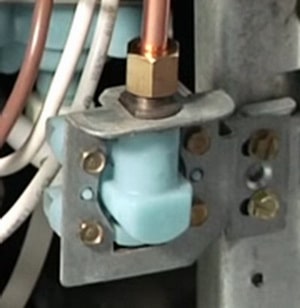
The water inlet valve controls water entry into the refrigerator. It requires both sufficient pressure and 120 volts AC to open.
Confirm Voltage and Pressure
Test the valve to determine if it is receiving power but failing to open. This step isolates the valve from upstream electrical issues.
- Shut off the water supply and unplug the refrigerator.
- Locate the valve at the bottom rear behind the access panel.
- Use a multimeter to check for 120V AC at the terminals during dispensing.
- Replace the valve if voltage is present but no water flows.
Replace the Inlet Valve
If the valve is defective, replacement is necessary to restore function. Ensure all connections are secure to prevent leaks.
- Turn off the water and power to the unit.
- Disconnect water lines and electrical connectors from the old valve.
- Unscrew the mounting bolts and remove the faulty valve.
- Install the new valve and reconnect all lines and wires.
- Turn on the water and check for leaks before restoring power.
Adjust Advanced System Settings
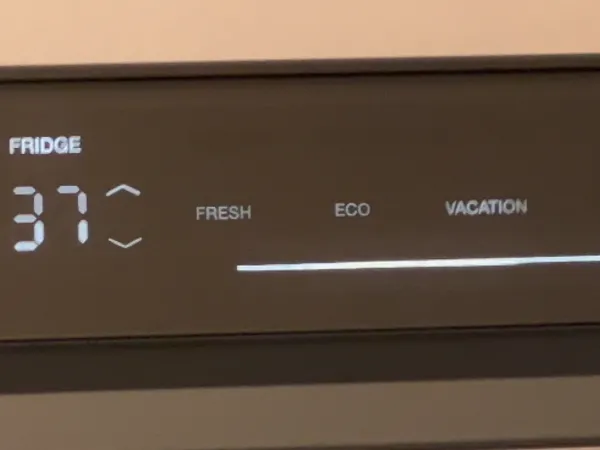
Certain operational modes can disable dispensing features. Verifying these settings ensures the system is not intentionally restricted by user configuration.
Disable Vacation and Sabbath Modes
Modes like Vacation or Sabbath can raise temperatures or disable dispensing entirely. Check your current mode if the dispenser behaves erratically.
- Navigate to Settings and select Vacation Mode to stop it.
- Check Sabbath Mode settings and end the duration if active.
- Note that Sabbath Mode may dim the display and disable sounds.
Reset the Control Panel
A simple reset can clear temporary software glitches affecting the dispenser. This process reboots the internal computer without altering temperature settings.
- Unplug the refrigerator for 5 minutes.
- Plug the unit back in and wait for the display to reboot.
- Test the dispenser to see if function is restored.
Resolve Ice Dispenser Related Issues
Ice and water dispensers share common components. Issues with ice dispensing can sometimes indicate broader mechanical problems affecting water flow.
Clear Ice Chute Obstructions
Ice buildup in the chute can block both ice and water pathways. Regular clearing prevents jams that strain the motor.
- Open the ice dispenser area to access the chute.
- Use a plastic tool to break up ice clumps gently.
- Pour warm water through the chute to melt residual ice.
Test Auger Motor and Solenoid
If ice does not dispense, the auger motor or solenoid may be faulty. These components drive the ice movement and door operation.
- Listen for a “clunk” sound when switching between cubed and crushed ice.
- Check the auger drive coupler for breakage if the motor runs but ice does not move.
- Replace the motor or solenoid if continuity tests fail.
Determine When to Call a Technician
Some issues involve complex wiring or sealed systems that require professional expertise. Recognizing these signs prevents unnecessary damage or safety hazards.
Identify Control Board Failures
Suspect the control board only after ruling out all individual components. Board replacement involves precise wiring and calibration.
- Consider board replacement if all switches and valves test good.
- Look for erratic display behavior or total power loss to components.
- Consult a certified technician for board diagnosis and installation.
Prioritize Safety During Repairs
Always follow safety protocols when inspecting internal components. Electricity and water pose significant risks if mishandled.
- Unplug the refrigerator before accessing any internal parts.
- Shut off the water supply before replacing valves or lines.
- Use only OEM replacement parts to ensure compatibility and safety.
Frequently Asked Questions About Thermador Water Dispenser
How do I unlock the Thermador water dispenser control lock?
Press and hold the button labeled “Control Lock” or the padlock icon for 3 seconds. Listen for a beep or watch for the padlock symbol to disappear from the display.
Why is my Thermador water dispenser not working after unlocking?
Common causes include a closed water supply valve, a clogged water filter, or a frozen water line. Verify the valve is open, replace the filter, and check for ice blockages.
How often should I replace the Thermador water filter?
Replace the water filter every 6 months or when the indicator light activates. Using an expired filter can restrict water flow and reduce water quality.
What causes a frozen water line in a Thermador refrigerator?
Freezing often occurs when the freezer temperature is set too low or the door is left open frequently. Adjust the temperature setting or manually thaw the line to resolve.
How do I reset the water filter indicator on my Thermador fridge?
Press the Settings button, navigate to Filter Status, and select Reset or Confirm. This updates the system to recognize the new filter.
Can a faulty door switch stop the water dispenser from working?
Yes, the dispenser disables if the system detects the door is open. A faulty door switch can falsely signal an open door, preventing water flow.
Key Takeaways for Unlocking Your Thermador Water Dispenser
Restoring your water dispenser usually starts with disabling the Control Lock by holding the designated button for three seconds. If the issue persists, systematically check the water supply valve, filter condition, and potential line freezing before investigating electrical components.
Most problems resolve with these basic troubleshooting steps, saving you time and repair costs. If you have verified all components and the dispenser remains inactive, contact a certified Thermador technician for advanced diagnostics.