You just installed a new unit or reset an old one, and now the digital display is blinking with no clear path forward. Learning how to program a water softener correctly is the only way to ensure you get soft water without wasting salt or water.
This guide walks you through gathering water data, calculating your specific hardness setting, and configuring regeneration cycles for your specific valve model. You will learn to avoid common errors that cause hard water breakthrough and excessive utility bills.
Gather Accurate Water Quality Data
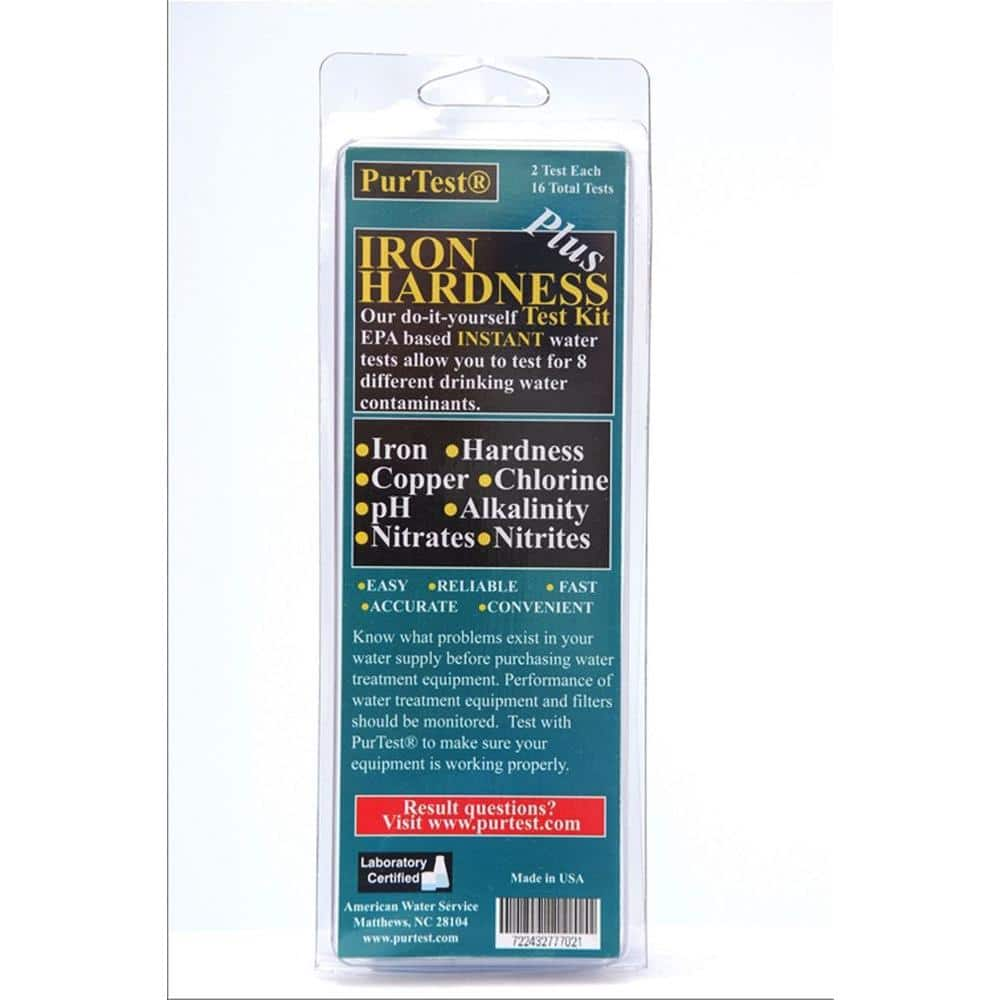
Successful programming starts with precise numbers from your water source. You cannot rely on guesses or generic factory settings to handle your specific water conditions.
Test Hardness, Iron, and Manganese Levels
Your softener needs three specific metrics to calculate its workload accurately.
- Water Hardness: Measured in grains per gallon (gpg) from calcium and magnesium.
- Iron Content: Measured in parts per million (ppm), which reduces resin capacity.
- Manganese Content: Measured in ppm, placing a heavy tax on the resin bed.
Use a professional lab test, a home kit, or your local Consumer Confidence Report for these figures.
Calculate Your Final Hardness Setting
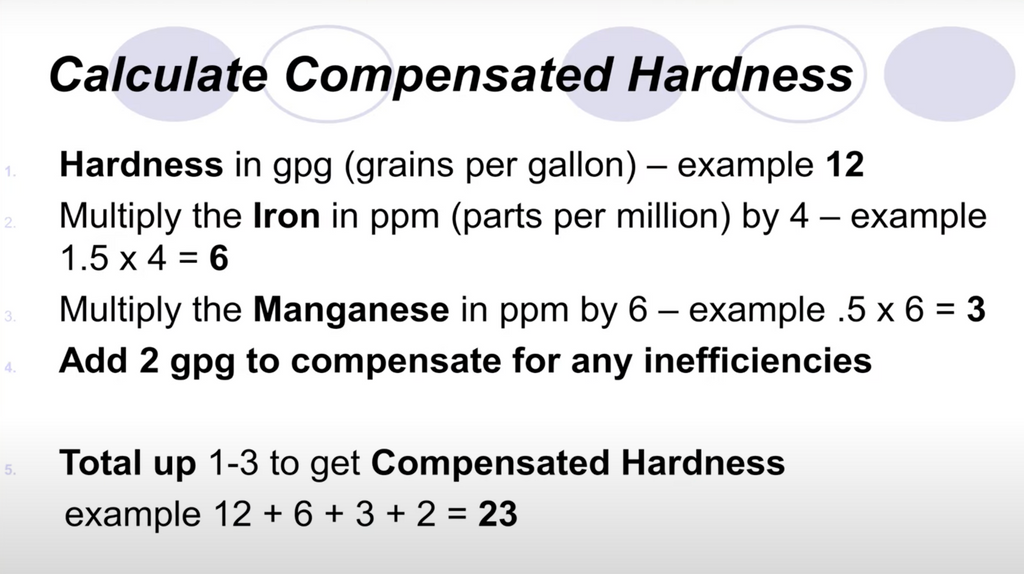
You must combine your hardness, iron, and manganese levels into one number for the controller. Use this formula: Hardness (gpg) + (Iron × 4) + (Manganese × 10) = Final Setting.
For example, if you have 6.5 gpg hardness, 2 ppm iron, and 3 ppm manganese, your calculation is 6.5 + 8 + 30, equaling 44.5. You would enter 44.5 into the hardness menu, not just the raw 6.5.
Pro Tip: In areas with fluctuating water quality, adding a 1–2 gpg buffer to your final setting prevents hardness breakthrough during spikes.
Estimate Daily Household Water Usage
The system uses your daily consumption to schedule regeneration cycles efficiently. Setting this incorrectly leads to wasted resources or premature resin exhaustion.
Determine Gallons Per Person
Standard estimates suggest using 75 to 80 gallons per person per day for average households. High-usage homes with long showers or large laundry loads should estimate up to 100 gallons per person.
Multiply your household size by your chosen estimate. A family of four using 75 gallons each requires a daily capacity of 300 gallons. This figure drives your grain load calculations.
Set the Correct Time and Date
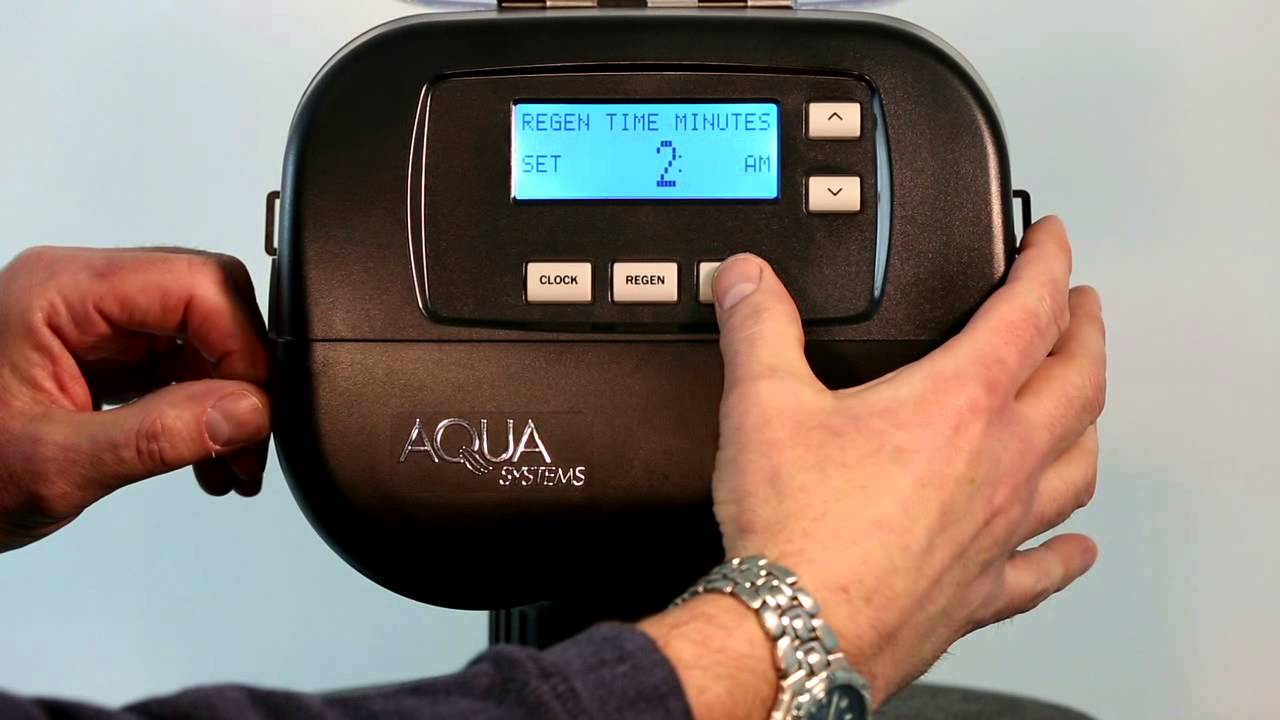
Accurate clock settings ensure your system regenerates when water demand is lowest. A wrong time setting can leave you without soft water during morning showers.
Program the Control Panel Clock
- Press the “Set Time” or “Clock” button on your panel.
- Use the Up/Down arrows to adjust hours, minutes, and AM/PM status.
- Press “Next” or “Clock” to move between time fields and days of the week.
Set your regeneration time between 12:00 AM and 5:00 AM, with 2:00 AM being the ideal default. This window ensures the system regenerates while everyone is asleep.
Enter the Final Hardness Value
Now you must input the calculated final hardness value into the controller memory. This step tells the valve exactly how much work the resin must do.
Access the Hardness Menu
Look for a menu labeled “Set Hardness,” “Hardness,” or “Water Hardness.” On Safeway valves, you may need to hold the Next and Up Arrow buttons for 3–5 seconds to access this screen.
Use the arrow keys to enter your final calculated value, such as 44.5. Avoid the common mistake of entering only the raw hardness number, as this causes the system to underestimate its workload.
Configure System Capacity and Cycle Frequency

This section defines how much work the unit performs before it must clean itself. Proper configuration balances efficiency with resin longevity.
Choose Grain Capacity and Calculate Load
Select the grain capacity matching your resin tank size, such as 24,000, 30,000, or 48,000 grains. Calculate your daily grain load by multiplying daily water use by your final hardness setting.
- Example: 300 gallons/day × 44.5 gpg = 13,350 grains removed daily.
Divide your total capacity by this daily load to find your regeneration frequency. A 30,000-grain system dividing by 13,350 equals roughly 2.25 days.
Set Regeneration Frequency
Aim for a regeneration cycle between 3 and 8 days. Cycles shorter than 3 days waste salt and water, while cycles longer than 8 days risk hard water slipping through. Adjust your salt dosage or hardness setting slightly to hit this target range.
Adjust Salt Dosage Settings
The amount of salt used per cycle directly impacts softening power and operating costs. You must match this setting to your system size and water conditions.
Set Pounds Per Regeneration
Manual systems require you to set the pounds of salt used per cycle. Standard ranges fall between 3 and 5 lbs, but larger systems need more.
- 1 cubic foot system: Set to approximately 9 lbs.
- 1.5 cubic foot system: Set to approximately 13.5 lbs.
Smart models with adaptive learning adjust this automatically, so no manual entry is needed. Always keep the brine tank filled but never above the max line to prevent salt bridging.
Choose Metered or Clock Regeneration Mode
Selecting the right trigger method ensures your system regenerates based on actual need rather than a fixed schedule.
Use Metered Demand Mode
This mode is best for most homes as it tracks actual water usage. The Auto setting uses reserve capacity logic to regenerate right before the resin is exhausted.
- Gallons Mode: Triggers after a specific volume is used.
- Off Mode: Disables metered control entirely.
Metered modes can save up to 40% more salt and water compared to time-based systems.
Use Clock-Controlled Mode
Only use this if your unit lacks a flow meter or for very low-usage scenarios. You set a fixed number of days between cycles, such as every 7 days.
Enable a Regen Day Override (e.g., every 10 days) to force a cycle if water usage is low, preventing stagnation in the tank.
Handle Valve-Specific Configuration Codes
Different manufacturers use unique button combinations to access advanced installer menus. Knowing your specific valve type is crucial for proper setup.
WaterCare Valve Setup
Enter the installer mode by holding the Next and + buttons simultaneously. Navigate through menus for hardness, days until regen, and hour/minute settings using the Next button.
You can also set service alarms for filter replacements and toggle the display backlight. These settings ensure the interface remains readable and the system alerts you to maintenance needs.
Safeway Valve Configuration
Access the operation mode by holding Next and the Down Arrow. Select Softening as your primary function and choose your brine refill mode.
- Pre-Refill (Recommended): Fills the brine tank 2 hours before regeneration.
- Post-Refill: Fills the tank immediately after regeneration.
Set the P Code to P5 for city water or P23 for well water to adjust backwash duration. Choose Normal + On Zero timing logic for the best balance of schedule and demand response.
Optimize Settings for Maximum Efficiency
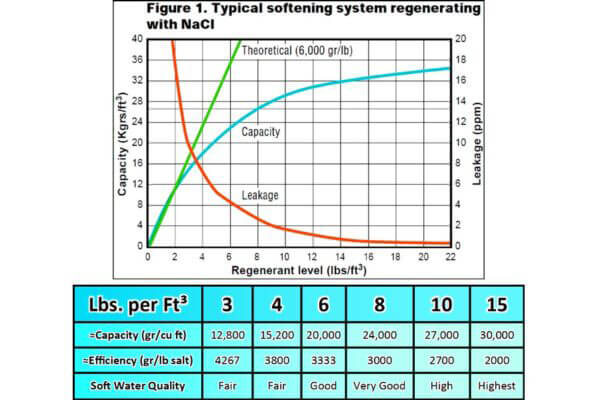
Fine-tuning your parameters reduces waste and extends the life of your equipment. Small adjustments can lead to significant long-term savings.
Extend Regeneration Intervals
Factory defaults often schedule regeneration every 3–4 days. Recalculate your settings to aim for 6–8 days if your water usage allows. This simple change cuts salt consumption significantly without sacrificing water quality.
Recalibrate After Changes
Update your settings whenever household size changes or water sources shift. Seasonal fluctuations in water hardness may also require a 1–2 gpg adjustment to your input value.
Run a manual regeneration immediately after programming to verify all mechanical functions work correctly. Watch for proper backwash flow, brine draw, and rinse cycles.
Prevent Common Programming Issues
Proactive maintenance prevents the most frequent causes of system failure and poor performance.
Avoid Salt Bridging
Check your brine tank monthly for a hard crust on top of the salt known as bridging. Break any crusts with a broom handle and clean the tank annually to remove sludge.
Fix Poor Softening Performance
If soap does not lather or spots appear on dishes, check your hardness setting first. Increase the value by 1–2 gpg and run a manual regeneration cycle.
Verify that your clock has not reset due to a power outage, as this can shift regeneration times to peak usage hours.
Follow a Strict Maintenance Schedule
Regular upkeep ensures your programmed settings remain effective for years. A well-maintained unit can last 10 to 15 years.
| Task | Frequency | Action Required |
|---|---|---|
| Check Salt Level | Monthly | Keep below max line and break bridges |
| Inspect for Leaks | Monthly | Check inlet, outlet, and drain lines |
| Test Water Hardness | Every 3–6 Months | Confirm output is consistently soft |
| Clean Brine Tank | Annually | Remove sludge and old salt residue |
| Verify Time Settings | After Power Outage | Reset clock to correct time |
Frequently Asked Questions About Programming Water Softeners
What is the formula for calculating water softener hardness settings?
Add your water hardness in gpg to four times the iron ppm and ten times the manganese ppm. This total is the final number you enter into the hardness menu to account for all contaminants.
How often should my water softener regenerate?
Most systems perform best when regenerating every 3 to 8 days. Cycles shorter than 3 days waste resources, while longer cycles risk hard water breakthrough.
What time of day is best for regeneration?
Set your system to regenerate between 12:00 AM and 5:00 AM, with 2:00 AM being ideal. This ensures the process happens during low water demand so you do not lose water pressure.
Why is my water still hard after programming?
Check if you entered the raw hardness instead of the calculated final setting including iron and manganese. Also, verify that the clock is correct and no salt bridge is blocking the brine draw.
Can I program my softener to use less salt?
Yes, by extending the regeneration interval to 6–8 days and ensuring you are not using excessive pounds of salt per cycle. Metered mode also saves significantly more salt than clock-based modes.
Key Takeaways for Programming Your Water Softener
Programming your water softener requires accurate data on water hardness, iron, and manganese to calculate the correct final setting. You must align your regeneration frequency and salt dosage with your actual household usage to avoid waste and ensure consistent soft water.
Always choose metered demand mode over clock mode when possible and schedule regeneration for the early morning hours. Run a manual regeneration after setup and stick to a monthly maintenance routine to keep your system running efficiently for years.