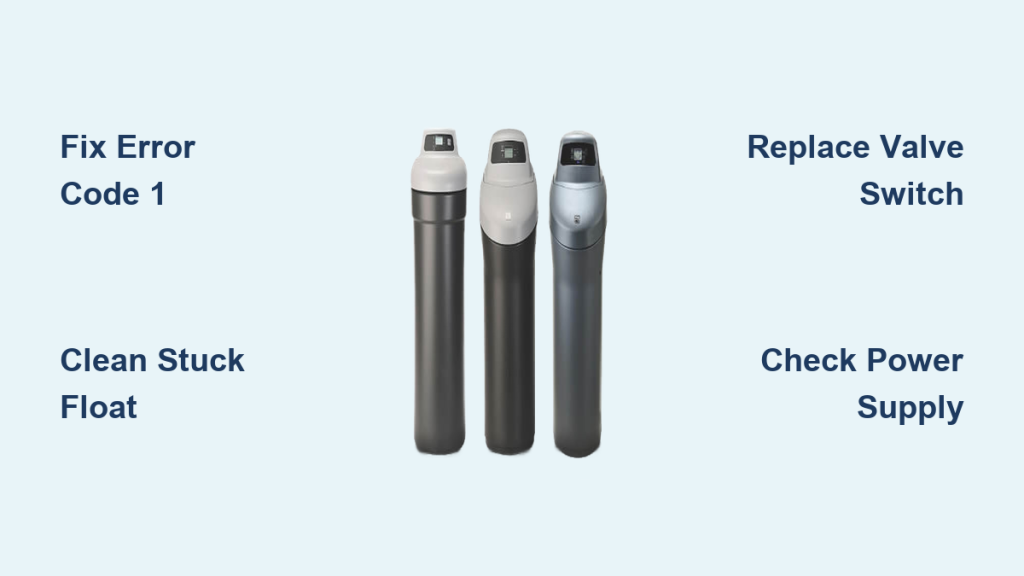
Your Kenmore water softener stops working properly when error codes flash or salty water flows from your tap. Thousands of homeowners rely on Ultra Soft and IntelliSoft models that can last 25 to 35 years with proper care. You do not need to replace your unit because Sears no longer offers service for these durable appliances.
Most issues are easily repairable with simple DIY fixes costing under $20. This guide teaches you to decode error messages, fix leaks, and clean clogged components without calling a technician. You will learn specific steps to restore soft water to your home quickly.
Decode Error Code 1 and Air 1 Messages

Error Code 1 or “Air 1” on your display indicates a faulty valve position switch rather than an airlock. This switch tells the control board when the rotor valve moves during regeneration cycles. If it fails to close, the system stalls and displays the error message constantly.
Test the Valve Switch with a Multimeter
- Unplug the unit from the wall outlet for safety.
- Remove the top cover by unclipping the three side clips.
- Locate the switch near the motor and cam mechanism inside.
- Disconnect the wires carefully from the switch terminals.
- Set your digital multimeter to Ohms or Diode Test mode.
- Place probes on the switch terminals to check resistance levels.
- Open position: Reading should show infinite resistance.
- Closed position: Reading should drop to 0 ohms and beep.
- Replace the switch if it does not close properly when pressed.
🔧 Pro Tip: A stuck cam or misaligned switch can also cause failure. Ensure the motor cam fully actuates the switch lever before buying parts.
Replace the Faulty Switch Component
- Order a compatible replacement like Model 370-0325 for IntelliSoft 370 series.
- Remove the old switch using a small screwdriver gently.
- Install the new one and align it precisely with the motor cam.
- Reconnect wires securely and mount the motor back in place.
- Reassemble the cover and perform the required 8-minute reset procedure.
- Hold “Select” to enter diagnostic mode and confirm switch activation.
✅ A successful fix allows a full regeneration cycle taking about 2 hours to complete without error.
Clear Error Code 3 Quickly

Error Code 3 points to a similar issue as Error 1 involving a failing internal switch. While some models differ slightly in layout, the repair process remains nearly identical for most Kenmore units.
Access and Replace the Internal Switch
- Unplug the softener from the power source completely.
- Remove the lid to expose the motor area and internal components.
- Unscrew the metal plate at the top carefully without dislodging the gasket.
- Swing the plate aside to access the switch mechanism fully.
- Remove two screws holding the switch and pop it off the mount.
- Install the new switch ensuring proper alignment with the cam.
- Reassemble all parts and test with an 8-minute reset cycle.
⚠️ Warning: If the error returns immediately after replacement, check for cam wear or damaged wiring to the control board.
Fix No Power or Blank Display Issues
A dead display means no power is reaching the control board to run your system. Do not replace the entire unit before diagnosing the power source and transformer systematically.
Verify Power Source First
- Confirm the unit is plugged in tightly to the wall outlet.
- Test the outlet with a lamp or phone charger to ensure power.
- Check your home circuit breaker or GFCI outlet if no power exists.
Inspect the Power Transformer
The transformer steps down household voltage for the timer and control board.
- Unplug the transformer from the wall outlet safely.
- Check both ends including wall plug and connection to the board.
- Look for loose, corroded, or frayed wires on the transformer.
- Reconnect any loose terminals firmly to restore connection.
- Replace the transformer if connections are good but power is absent.
Replace a Failed Timer Control Board
If power reaches the unit but the display stays dark, the timer may be dead.
- Unplug the softener from the electrical outlet.
- Open the lid by releasing front clips and lifting to free rear tabs.
- Remove the control panel by pressing side locking tabs and pulling forward.
- Disconnect the salt tank light and main wiring harness carefully.
- Pull out the timer and install a new one matching your model.
- Reconnect all wires, reassemble, and program according to your manual.
🛠️ Note: Programming varies by model. Refer to online manuals for IntelliSoft 420 or microMAX 625.348460.
Stop Salty Water Taste Immediately
Salty water indicates brine is entering your plumbing system unexpectedly. This can damage faucets and appliances so you must act fast to resolve the issue.
Clean the Stuck Safety Float
The float prevents overfilling of the brine tank with excess water.
- Wait until the unit is NOT regenerating before starting work.
- Remove the softener lid and the salt level indicator tube cap.
- Extract the safety float mechanism from the brine tank.
- Disassemble the float carefully with a small screwdriver.
- Soak parts in hot water for 5 minutes to loosen debris.
- Move the float up and down under water to free any stuck parts.
- Ensure the small ball at the bottom moves freely without restriction.
- Reinstall the mechanism and test the system operation.
Adjust High Float Settings
An improperly set float allows too much water into the brine tank.
- Locate the float adjustment screw or clip on the mechanism.
- Turn it to lower the water level typically 6 to 12 inches above salt.
- Manually initiate a regeneration to verify correct fill level.
Replace a Damaged Entry Valve
If brine persists after cleaning the float, the entry valve may be cracked.
- Shut off water supply to the softener unit completely.
- Inspect the entry valve at the back of the unit for cracks.
- Contact a professional for replacement if the valve is damaged.
❌ Never use table salt or rock salt as impurities cause valve clogs and float failure.
Fix Leaking Water Softener Units

Water pooling around the unit demands immediate attention to prevent floor damage. Identify the source quickly to stop the leak effectively.
Tighten Loose Water Line Connections
- Turn off water supply using the valve at the back of the unit.
- Use a wrench to tighten connections between softener and plumbing.
- Check both inlet and outlet lines for any remaining drips.
Replace Worn Rotor Valve Seal
A failing seal under the rotor valve causes slow leaks inside the unit.
- Remove the valve head using the quick-connect clip tool.
- Extract the rotor assembly from the valve body carefully.
- Inspect the rubber seal on the bottom for cracks or flattening.
- Replace the seal if it shows any signs of wear or damage.
- Lubricate with food-grade silicone before reassembly to ensure fit.
Repair Brine Tank Overflow
A constantly full brine tank usually means a float or gasket issue.
Clean a Stuck Float Assembly
- Turn off water and power to the softener unit.
- Disconnect the black water supply hose from the float valve.
- Use pliers to remove union fittings and lock rings carefully.
- Pull out the float and clean all salt buildup from parts.
- Ensure the float moves freely up and down the shaft.
- Reinstall with the hose tab properly seated in the valve.
Replace Degraded Venturi Gasket
This small half-moon gasket controls water intake into the brine tank.
- Unscrew the venturi valve from the assembly gently.
- Remove the filter, spring, and old gasket from the valve.
- Install a new gasket aligning it with the internal hole precisely.
- Reassemble carefully to avoid costly venturi valve replacement later.
Restore Low Water Pressure
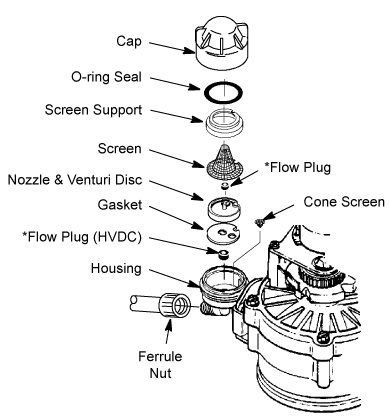
Weak flow or hard water despite regeneration suggests clogged components. Check these areas to restore full pressure and softening performance.
Clear the Venturi Orifice
The venturi creates suction to draw brine during the regeneration cycle. A clogged orifice stops regeneration completely.
- Remove the venturi assembly from the softener unit.
- Use a thin wire or pin to clear the tiny hole in the orifice.
- Rinse the part under running water to remove all debris.
- Reinstall the assembly and test the system operation.
✅ Visual Cue: During regeneration, you should hear a gurgling sound proving brine draw.
Rinse Both Strainers
Two often-overlooked filters trap debris and reduce water pressure significantly.
- Primary strainer: Located at the brine well inlet.
- Secondary strainer: Small, mushroom-shaped part inside the brine tank.
- Remove both strainers from their positions carefully.
- Rinse under running water until all debris is gone.
- Reinstall ensuring the secondary strainer is fully seated.
Inspect Resin Bed Condition
Resin beads can degrade over time and cause pressure issues.
| Condition | Cause | Solution |
|---|---|---|
| Dry/crumbly | Dried out | Soak in clean water before reuse |
| Clumped/dark | Iron/manganese | Clean with resin cleaner or replace |
| Yellow deposits | Poor salt quality | Switch to pure softener salt |
🔄 Resin lasts 25+ years if kept moist and clean. Never let it dry out during maintenance.
Sanitize to Remove Bacteria
Musty smells or biofilm indicate bacterial growth in your system. Sanitize annually to keep water fresh and safe.
Use Bleach to Kill Bacteria
- Open the salt hole cover on the top of the unit.
- Add 3 gallons of water to create 3 inches of depth.
- Remove the brinewell lid carefully.
- Pour in 1 to 2 tablespoons of household bleach.
- Replace the lid securely.
- Open the bypass valve to allow flow.
- Press and hold “ON/OFF-HOLD” for 3 seconds to start manual regeneration.
The cycle will draw bleach through the system, sanitize the resin, and flush contaminants.
Perform Routine Cleaning on Nozzle and Flow Plugs
Buildup reduces efficiency and causes performance issues over time. Clean these parts as needed to maintain optimal operation.
Clean Nozzle and Flow Plugs
- Unplug the unit and engage bypass valve to stop water flow.
- Remove the softener lid to access internal components.
- Take out the nozzle and disassemble all pieces carefully.
- Wash parts in warm, soapy water to remove buildup.
- Use a toothpick to clean the two flow plugs thoroughly.
- Reassemble correctly ensuring lettered side of flow plugs faces up.
- Reinstall the nozzle and power on the unit.
📝 Pro Tip: Lay parts out in order during disassembly to avoid confusion during reassembly.
Deep Teardown for Persistent Issues
Recurring errors or poor performance may require a full inspection of the unit. Perform this deep teardown for stubborn problems.
Full Valve Assembly Removal
- Turn off power and water to the softener unit.
- Use the quick-connect clip to remove the valve head.
- Extract the valve assembly noting O-ring positions carefully.
Inspect and Clean Key Parts
- Venturi orifice: Clear with a pin to remove blockages.
- Strainers: Rinse thoroughly under running water.
- O-rings: Replace if cracked or brittle to prevent leaks.
- Rubber seals: Check venturi gasket and rotor seal for wear.
Handle Resin Carefully
- Use a bucket to catch beads if removing resin from tank.
- Never let resin dry out during the process.
- Wash tank with diluted vinegar to remove scale buildup.
- Rinse well before reassembly of all components.
Reassemble and Test
- Reverse disassembly steps to put unit back together.
- Ensure strainers are seated and gaskets intact.
- Refill brine tank with pure salt for softening.
- Manually trigger regeneration to test operation.
- Verify brine suction, backwash flow, and float shutoff.
Prevent Problems with Smart Maintenance
Avoid emergencies with simple habits and regular care of your unit.
Use the Right Salt
- ✅ Use only softener-grade salt in pellet or crystal form.
- ❌ Never use table salt, rock salt, or ice melt as they cause clogs.
Refill Salt Correctly
- Add salt when tank is nearly empty to prevent issues.
- Fill to two-thirds full maximum capacity.
- Overfilling causes salt bridging which blocks brine creation.
Break Salt Bridges
- Use a broom handle or rubber mallet gently.
- Tap the side of the tank to loosen crust.
- Break the crust so water contacts the salt pile.
Clean Brine Tank Annually
- Drain the tank completely.
- Remove remaining salt and sludge from bottom.
- Wash with mild soap or vinegar solution.
- Rinse thoroughly before refilling.
- Refill with fresh salt for operation.
Troubleshooting Checklist at a Glance
| Symptom | Likely Cause | Fix |
|---|---|---|
| Error 1 / Air 1 | Bad valve switch | Replace switch and do 8-minute reset |
| No Display | Power loss or bad transformer | Check outlet and replace transformer or timer |
| Salty Water | Stuck float or high float | Clean float and adjust level settings |
| Leaking | Loose line or worn seal | Tighten connections or replace seal |
| Full Brine Tank | Stuck float or bad gasket | Clean float and replace venturi gasket |
| Low Pressure | Clogged venturi or strainers | Clean components and inspect resin |
| Constant Running | Failed rotor switch | Replace rotor position switch |
Frequently Asked Questions About Kenmore Water Softener Repair
How do I clear Error Code 1 on my Kenmore softener?
Error Code 1 indicates a faulty valve position switch. Unplug the unit for 8 minutes to reset. If the error returns, test the switch with a multimeter and replace it if it fails to show 0 ohms when closed.
Why does my water taste salty after regeneration?
Salty water usually means the safety float is stuck or the brine tank is overfilling. Clean the float mechanism thoroughly and ensure the small ball at the bottom moves freely to stop brine from entering your pipes.
What causes a blank display on my Kenmore water softener?
A blank display suggests power loss, a failed transformer, or a dead timer. Check your outlet and breaker first. If power is present, inspect the transformer wiring or replace the control board timer.
How often should I sanitize my Kenmore water softener?
You should sanitize your unit annually or whenever you notice a musty smell. Use 1 to 2 tablespoons of household bleach poured into the brinewell followed by a manual regeneration cycle.
Can I use regular table salt in my Kenmore softener?
No, never use table salt or rock salt. These contain impurities that clog valves and damage the resin bed. Use only pure softener-grade salt pellets or crystals designed for these systems.
Key Takeaways for Kenmore Water Softener Repair Success
Most Kenmore water softener repair issues stem from minor maintenance lapses rather than total system failure. You can fix error codes, leaks, and salty water by cleaning components or replacing inexpensive switches and gaskets. Regular sanitization and using the correct salt type will extend your unit life significantly.
Start by diagnosing your specific symptom using the troubleshooting checklist provided. Gather basic tools like a multimeter and screwdriver to perform these repairs yourself today. Your softener can last decades longer with proper care and timely intervention.