Is your Morton water softener failing to regenerate or displaying confusing error codes? A frozen screen or missed cycle often means the system needs a fresh start to function correctly again. Learning how to reset Morton water softener units properly can restore clean water flow without calling a technician.
This guide details every method to reboot your system, from simple button combinations to full power cycles. You will discover how to clear error messages, force a regeneration cycle, and fix brine tank issues that mimic electronic failures.
Access the Control Panel on Your Unit
You must locate the specific interface for your model before attempting any reset procedure. Most modern Morton units feature a digital display with navigation buttons located on the top or front of the cabinet.
Identify Your Electronic Model Type
Morton manufactures both mechanical and electronic systems, but only the latter requires digital resetting. Look for model numbers like M100, M150, or Smart Choice Electronic on the label. These units rely on a microprocessor that benefits from rebooting when glitches occur. Mechanical models use dials and timers that do not have a digital reset function.
Check Current Display Status
Examine the screen closely to determine the nature of the problem before pressing buttons. Note if the display is completely blank, flashing an error code, or stuck on a specific time. A blank screen suggests a power loss, while messages like “CLEAN” indicate internal maintenance alerts.
Perform a Soft Reset on the System
A soft reset is the safest first step to fix minor glitches without erasing your programmed settings. This action reboots the internal computer much like restarting a frozen smartphone.
Press and Hold the Up Arrow
Find the Up Arrow button on your control panel face. Press and hold this button continuously for at least 5 seconds until the screen blinks or flashes. This specific command tells the processor to restart its operating cycle.
Wait approximately 10 to 15 seconds for the unit to complete its reboot sequence. You may hear a clicking sound as the internal valves return to their default positions.
Pro Tip: If the screen does not respond to the Up Arrow, check that the unit is plugged into a working electrical outlet.
Confirm Normal Operation After Reboot
Watch the display closely to ensure the time and next regeneration schedule reappear. If the screen returns to normal operation, monitor the unit for 24 hours to verify the issue is resolved. Proceed to a hard reset if the problem persists or the screen remains unresponsive.
Execute a Hard Reset for Persistent Errors

A hard reset clears temporary memory errors and forces the system to reinitialize completely. Use this method when the softener fails to regenerate or displays persistent error codes after a soft reset.
Unplug the Power Supply Completely
Disconnect the power cord from the electrical outlet or switch off the dedicated circuit breaker. Leave the unit disconnected for at least 2 minutes to allow internal capacitors to discharge fully. This waiting period ensures all residual electricity leaves the control board.
⚠️ Warning: Do not attempt to open the internal casing of the unit as this poses a severe electrical shock risk.
Reconnect Power and Stabilize System
Plug the unit back in or restore power at the circuit breaker to begin the startup sequence. The display will likely show a “Wait” message or a countdown as the system initializes. Allow the softener several minutes to stabilize before interacting with the controls.
Reprogram Settings if Necessary
Some models retain data while others revert to factory defaults after a power loss. If your time or hardness settings are missing, press the Menu or Setup button to re-enter them. You will need to input the current time, water hardness level, and preferred regeneration day.
Force a Regeneration Cycle Manually
Resetting the electronics is only half the process; you must verify the system can physically regenerate. Forcing a manual cycle flushes the resin bed and confirms the motor and valves are working.
Enter Manual Regeneration Mode
Press and hold the Down Arrow button for 3 seconds on most electronic Morton models. The display should change to read “RECHARGE NOW” or “MANUAL REGEN” to indicate readiness. Press Yes or Enter to confirm and start the cycle immediately.
Alternatively, navigate through the menu by selecting Maintenance followed by Start Regeneration. This achieves the same result through the main interface.
Monitor the Process Closely
The softener will shut off water flow briefly before beginning the backwash phase. Listen for water flowing into the drain line as the system rinses and refills with brine. The entire process typically takes between 60 and 90 minutes to complete.
Visual Cue: You should hear water running to the drain within the first few minutes; silence indicates a potential fault.
Cancel Regeneration If Necessary
Press and hold the Up Arrow or Exit button if you need to stop the cycle early. Confirm the cancellation prompt if the screen asks for verification. Avoid stopping cycles frequently as this can reduce the overall efficiency of your water softening.
Clear Brine Tank and Reservoir Issues
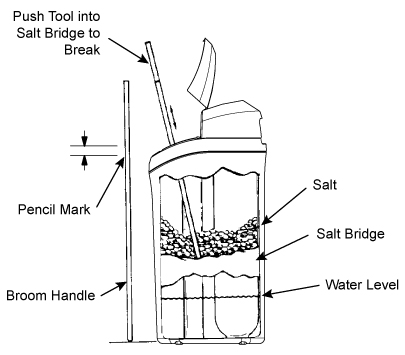
A clogged brine tank can prevent successful regeneration even after a perfect electronic reset. Salt bridges or sludge buildup often mimic electronic failures by blocking salt from dissolving.
Inspect the Brine Tank Interior
Remove the lid and look inside for hard crusts known as salt bridges or wet sludge at the bottom. Check if the salt level is low or if the tank is completely empty. Ideal conditions include loose salt crystals with about 1 to 2 inches of water visible at the bottom.
Break Up Salt Bridges Carefully
Use a broom handle or a plastic rod to gently break apart any hardened salt crusts you find. Do not use metal tools like screwdrivers because they can crack or damage the plastic tank lining. Vacuum out excess water or sludge with a wet/dry vac if the bottom looks muddy.
Refill with Clean Salt Only
Add high-quality pellet or crystal salt until the tank is half full to ensure proper brine creation. Use Morton Clean & Protect or similar high-purity salts designed for softeners. Never mix different types of salt, such as pellets with blocks, as this increases the risk of future bridging.
Troubleshoot Common Reset Issues
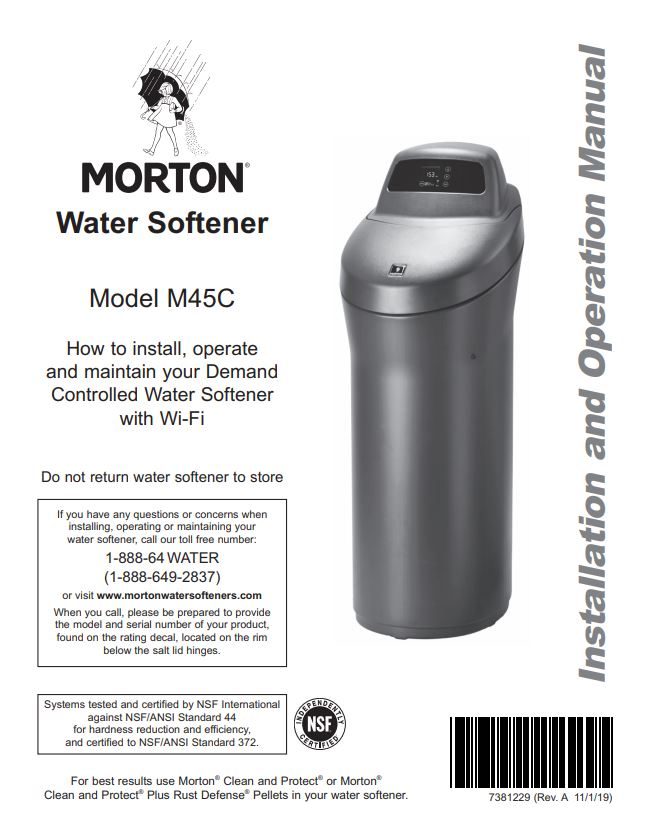
Some problems require specific diagnoses beyond a standard reset procedure. Use these targeted solutions if your unit displays specific error messages or behaviors after rebooting.
No Power After Reset Attempts
Test the electrical outlet with another device to ensure it is receiving power. Check nearby GFCI outlets to see if they have tripped and need resetting. Inspect the small black transformer on the power cord for cracks or warmth, which indicates damage.
Error Codes After Reboot
Specific messages require distinct actions to resolve permanently.
“CLEAN” Message
This indicates fouling in the resin bed that requires cleaning. Run a manual regeneration and add a specialized resin cleaner to the brine tank.
“RECHARGE NOW” Flashing
The system missed a scheduled regeneration cycle due to a power interruption. Confirm the current time is set correctly and ensure power stability.
“LOW SALT” Warning
Add more salt even if the tank appears to have some left. Sensors often misread bridged salt as a full tank.
Prevent Future Reset Needs
Regular maintenance reduces the frequency of required resets and extends the life of your unit. Consistent care prevents the minor glitches that lead to major malfunctions.
Schedule Monthly Checks
Inspect your salt level and look for bridges once every month. Wipe the control panel with a dry cloth to prevent moisture buildup. Listen for the normal sounds of regeneration to ensure the motor is running smoothly.
Use Quality Salt Products
Low-grade salts contain impurities that clog the system and damage components. Stick to evaporated salt pellets for the best performance and least amount of waste. High-purity salt dissolves cleaner and leaves less residue behind.
Protect from Power Surges
Install a surge protector on the outlet powering your water softener. Voltage spikes from storms or grid fluctuations can corrupt settings and damage electronics. This simple device adds a layer of protection for your investment.
When to Call a Professional Technician
Certain issues indicate hardware failure that DIY resets cannot fix. Recognizing these signs saves time and prevents further damage to your plumbing.
Signs You Need Service
Contact support if the control board refuses to power on after multiple reset attempts. Seek help if water remains hard despite successful regeneration cycles. Continuous error codes or visible leaks around valves also require professional attention.
Call Morton Customer Support at 1-877-581-7378 for certified assistance. Visit mortonwater.com to find authorized technicians in your local area.
Frequently Asked Questions About Resetting Morton Water Softeners
How do I reset my Morton water softener after a power outage?
Unplug the unit for two minutes, then plug it back in to force a hard reset. You may need to reprogram the current time and hardness settings if they were lost.
What does the “CLEAN” message mean on my Morton softener?
This alert indicates that the resin bed is fouled and needs cleaning with a specialized resin cleaner product. Run a manual regeneration cycle after adding the cleaner to restore performance.
Why is my Morton water softener not regenerating after a reset?
Check for salt bridges in the brine tank or ensure the unit is plugged into a working outlet. Verify that the regeneration time and day are programmed correctly in the menu.
Can I reset my Morton softener without losing my settings?
Yes, performing a soft reset by holding the Up Arrow usually preserves your programmed data. A hard reset via power cycling may erase settings on some older models.
How often should I manually regenerate my Morton system?
You typically only need to force regeneration if you notice hard water or after changing salt types. Regular automatic cycles handle daily needs unless water usage spikes significantly.
Key Takeaways for Resetting Your Morton Water Softener
Resetting your system involves a logical progression from a simple button hold to a full power cycle and manual regeneration. Most issues resolve quickly by holding the Up Arrow or unplugging the unit for two minutes to clear memory errors. Regular maintenance of the brine tank prevents many common problems that mimic electronic failures.
Start with a soft reset today to see if it clears your specific error code or frozen screen. If problems persist after following these steps, contact Morton support for professional diagnosis and repair services.